Hosting Plans
Hosting plans outline the available services and limitations for users. Docker images specify the pre-installed services for a plan. Enabled Features determine which pages users can access from the HiTechCloud interface.
List hosting plans
- With HiTechAdmin
- With HiTechCloudCLI
To list existing plans navigate to Plans page:
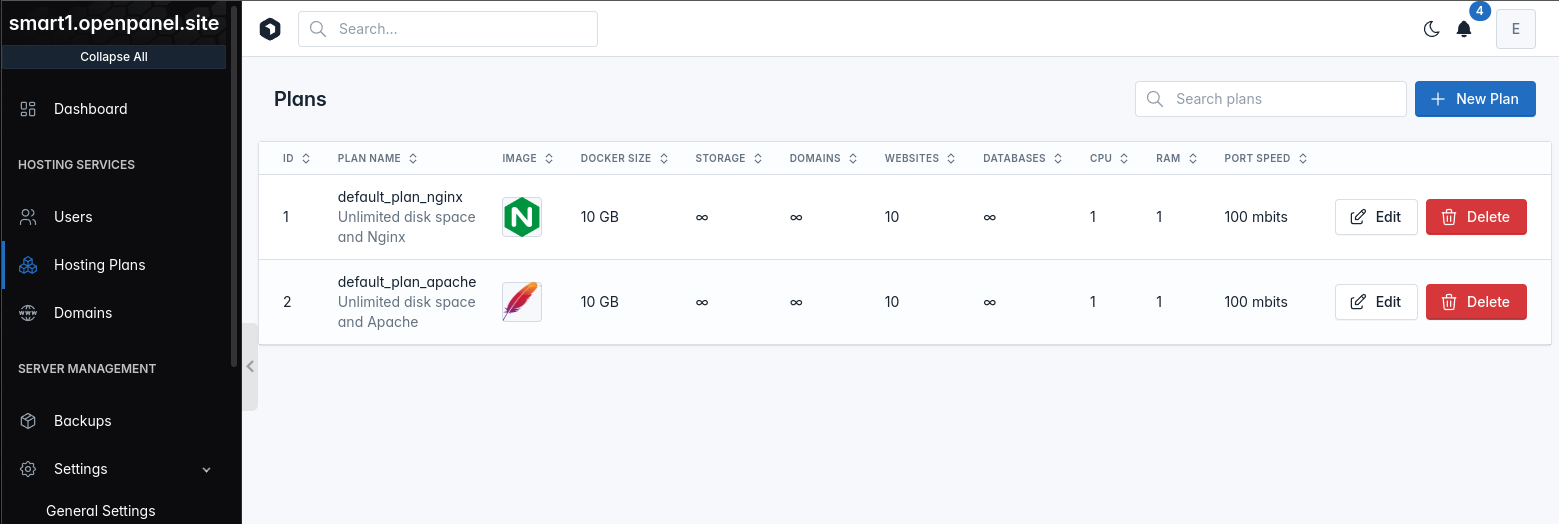
| Field | Description |
|---|---|
| ID | Unique ID for the plan. |
| Plan Name | Display name that users will see in their HiTechCloud dashboards. |
| Description | Visible only to administrators. |
| Image | Name of the Docker image used when creating new accounts on the plan. |
| Docker Size | Disk space allocated for the user's container . |
| Storage | Disk space allocated for user's websites files (/home/user/ directory). |
| Domains | Total number of domain names allowed per user on the plan. |
| Websites | Total number of websites (WordPress, NodeJS, Python) per user on the plan. |
| Databases | Total number of MySQL databases allowed per user on the plan. |
| CPU | Number of CPU cores dedicated to the user on this hosting plan. |
| RAM | Physical Memory (RAM) in GB allocated to the user on this hosting plan. |
| Port Speed | Maximum post speed for users in mbit/s. |
| Inodes Limit | (DEPRECATED) Limits the total number of files allowed in the container. |
To list all current hosting packages (plans) run:
hitechcloudcli plan-list
Example output:
hitechcloudcli plan-list
+----+-----------------+------------------------+---------------+----------------+------------+--------------+----------+------+------+-----------------+-----------+
| id | name            | description            | domains_limit | websites_limit | disk_limit | inodes_limit | db_limit | cpu  | ram  | docker_image    | bandwidth |
+----+-----------------+------------------------+---------------+----------------+------------+--------------+----------+------+------+-----------------+-----------+
|  1 | cloud_4_nginx   | 20gb space and Nginx   |             0 |             10 | 20 GB      |      1000000 |        0 | 4    | 4g   | dev_plan_nginx  |       100 |
|  2 | cloud_4_apache  | 20gb space and Apache  |             0 |             10 | 20 GB      |      1000000 |        0 | 4    | 4g   | dev_plan_apache |       100 |
|  3 | cloud_8_nginx   | 80gb space and Nginx   |             0 |             50 | 80 GB      |      2000000 |        0 | 8    | 8g   | dev_plan_nginx  |       200 |
|  4 | cloud_8_apache  | 80gb space and Apache  |             0 |             50 | 80 GB      |      2000000 |        0 | 8    | 8g   | dev_plan_apache |       200 |
+----+-----------------+------------------------+---------------+----------------+------------+--------------+----------+------+------+-----------------+-----------+
You can also format the data as JSON:
hitechcloudcli plan-list --json
Create a plan
- With HiTechAdmin
- With HiTechCloudCLI
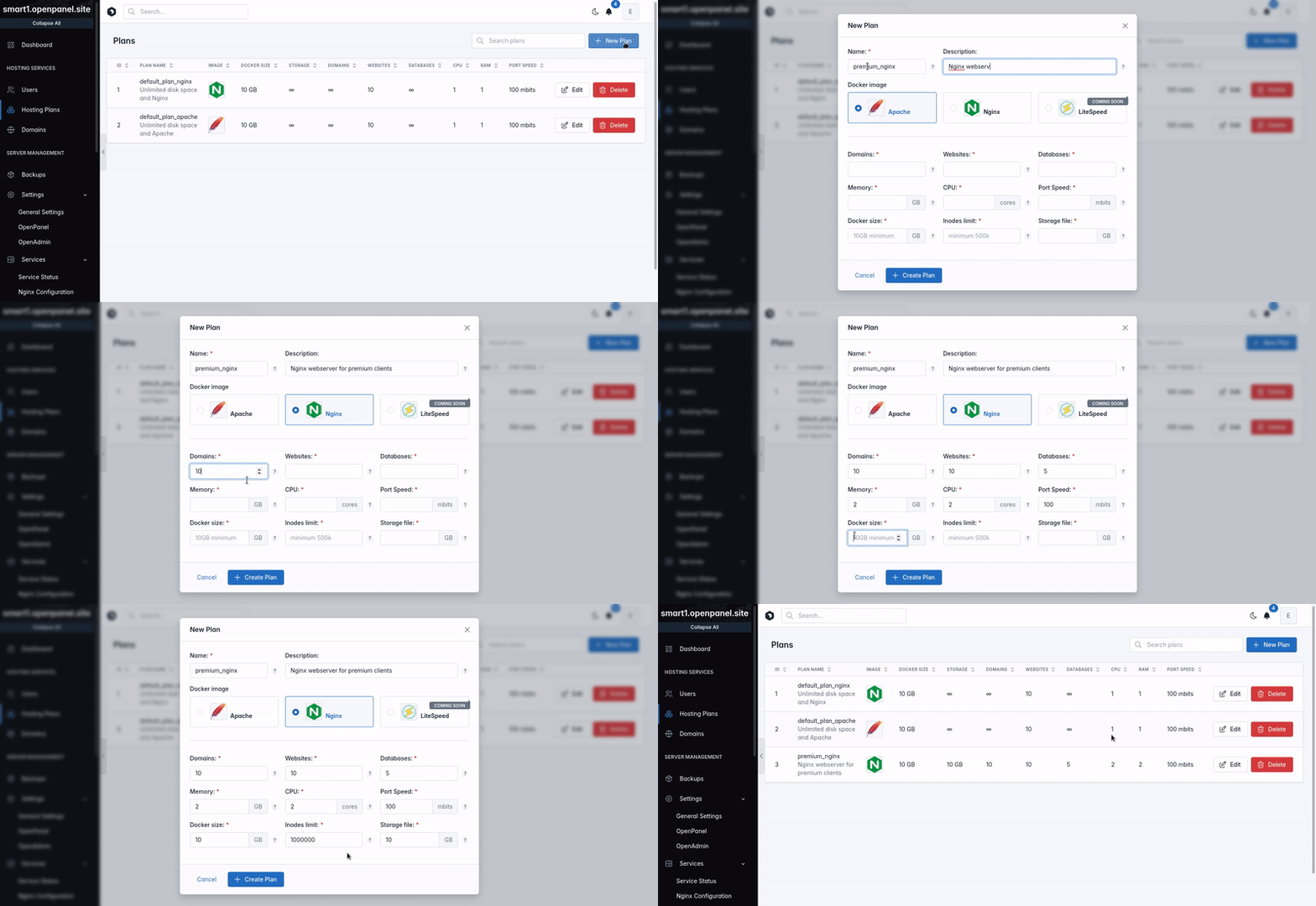
To create a new hosting plan click on the 'Create new plan' button and set the desired limits for the plan.
To create a new plan run the following command:
hitechcloudcli plan-create <NAME> <DESCRIPTION> <DOMAINS_LIMIT> <WEBSITES_LIMIT> <DISK_LIMIT> <INODES_LIMITS> <DATABASES_LIMIT> <CPU_LIMIT> <RAM_LIMIT> <DOCKER_IMAGE> <PORT_SPEED_LIMIT>
Example:
hitechcloudcli plan-create cloud_8 "Custom plan with 8GB of RAM&CPU" 0 0 15 500000 0 8 8 nginx 200
Change user plan
Please visit this page
Modify plan
To change plan limits click on the edit button for the plan and set the new limits.
| Step 1. | Step 2. |
|---|---|
 | 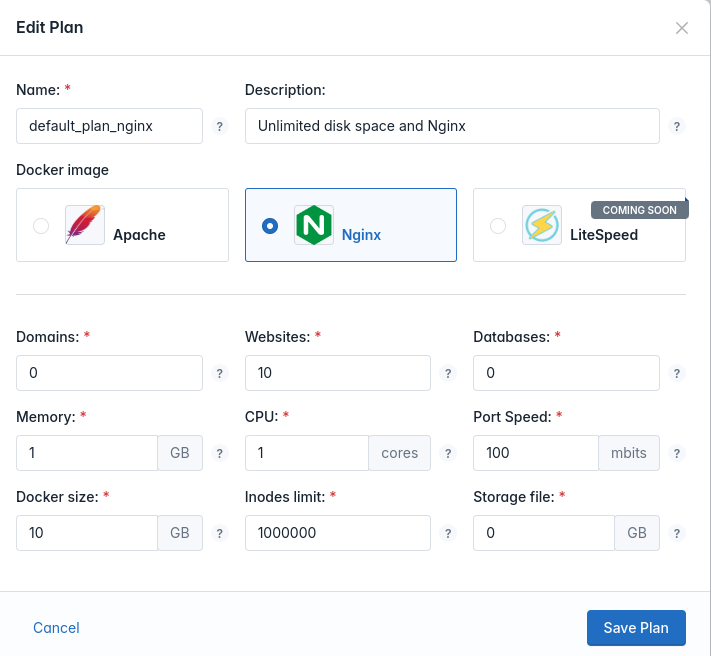 |
The new limits will be applied immediately to all accounts.
List Users on Plan
- With HiTechAdmin
- With HiTechCloudCLI
To view all users that are currently using a hosting plan, simply sort the users table by that plan name, or in the search fields type the plan name.
List all users that are currently using a plan:
hitechcloudcli plan-usage
Example:
hitechcloudcli plan-usage 2
+----+----------+-------+----------------+---------------------+
| id | username | email | plan_name      | registered_date     |
+----+----------+-------+----------------+---------------------+
|  2 | rasa     | rasa  | cloud_4_apache | 2023-11-30 10:33:52 |
|  3 | aas      | aas  | cloud_4_apache | 2023-11-30 12:01:49 |
+----+----------+-------+----------------+---------------------+
You can also format the data as JSON:
hitechcloudcli plan-usage --json
Delete Plan
- With HiTechAdmin
- With HiTechCloudCLI
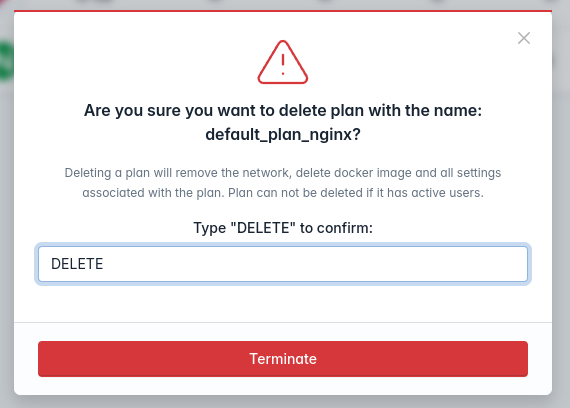
To delete a hosting plan click on the delete button next to the plan name.
| Step 1. | Step 2. |
|---|---|
 |  |
To delete a hosting plan:
hitechcloudcli plan-delete <PLAN_NAME>
Example:
hitechcloudcli plan-delete 32
NOTE: Plan can not be deleted if it has users assigned.