0.1.6
Released on April 15, 2024
🐛 Bug fixes
- Fixed bug durring ModSecurity installation process (reported by reyokh)
- Fixed bug on HiTechAdmin > Users with displaying server name
- Fixed bug on HiTechAdmin > Users > Edit information with modal-backdrop left after closing the modal.
- Fixed bug on HiTechAdmin > General Settings with the disabled input field causing 500 error on save.
- Resolved an issue with the PHP-FPM service that led to WordPress prompting for FTP credentials during plugin installation and media uploads.
- Fixed bug where suspended users were being excluded from search results in the HiTechAdmin > Users section.
- Fixed bug where the wrong HiTechCloud version was shown in the sidebar under HiTechCloud.
- Fixed bug where errors for the HiTechAdmin section were being logged in api.log instead of the error.log file.
- Fixed bug with PHP installation in
hitechcloudcli php-install_php_versionscript that caused the missing php-fpm service in containers. - Fixed bug with the
hitechcloudcli php-default_php_versionscript that caused the new default php version not to be set for cli. - Fixed bug with
hitechcloudcli hostname-sslscript failing to renew SSL. - Fixed bug with permissions not permiting user to edit crontab via terminal
- Fixed bug Memcached allocation slider bug #89
🚀 New features
- Turkish translation 🇹🇷
- Docker images can now be downloaded, updated and deleted from the HiTechAdmin > Docker Settings page.
- Introduced HiTechAdmin > API Settings page, enabling API access, token generation, curl command execution, request sending, response viewing, and API access log monitoring.
- Added a feature that allows for manual initiation of updates via the HiTechAdmin > General Settings section.
- HiTechAdmin > ModSecurity interface.
hitechcloudcli nginx-modsecscript that allows admins to: update OWASP Core Ruleset, List ModSecurity rules and Logs, Enable/Disable Rules and view domain settings.- Custom HiTechCloud and HiTechAdmin templates can now be defined by the Administrator
- dev_mode
- BasicAuth for HiTechAdmin panel
- DNS zone export for HiTechCloud > Edit DNS Zone
- Selfsigned SSL inside docker containers for Nginx & Apache
- Notifications on admin logins from new IP address
- Email alerts for the Notifications center
💅 Polish
- Added check if docker images exist before creating plans.
- The system now logs the admin username to identify who performed actions for a user.
- Moved all JavaScript code for HiTechAdmin to external files.
- All responses from HiTechAdmin are now compressed, including pages (HTML), templates (JavaScript & CSS), and API responses (JSON).
- Added online status indicators to the Users table in HiTechAdmin.
- MySQL service is now listening on both
localhostand127.0.0.1 - New default HiTechAdmin theme
- Added checks to remove apt cache and temporary files after install process
- Custom cron file
/etc/cron.d/hitechcloud - HiTechAdmin login log
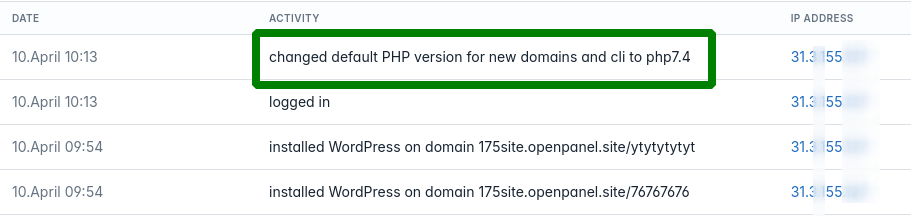
- Default PHP version change is now logged
- Added warning messages for unlimited disk usage on HiTechAdmin > Users > single user page.
dev_mode
dev_mode allows developers to view original responses from HiTechAdmin and detailed error messages. When enabled, the following occurs:
- html/css/js code from the templates is not minified
- json responses are not minified
- detailed error messages are shown
To enable dev_mode:
hitechcloudcli config update dev_mode on
To disable dev_mode:
hitechcloudcli config update dev_mode on
and restart admin service.
BasicAuth for HiTechAdmin
As an additional security measure, BasicAuth can be enabled for HiTechAdmin panel. Instruction

API access is automatically disabled when BasicAuth is enabled.
To enable basic authentication for HiTechAdmin, run commands:
hitechcloudcli config update basic_auth yes
hitechcloudcli config update basic_auth_username STRONG_USERNAME_HERE
hitechcloudcli config update basic_auth_password STRONG_PASSWORD_HERE
then reload the HiTechAdmin service:
service admin reload
Email Alerts
You can now receive email alerts from the Notifications center!
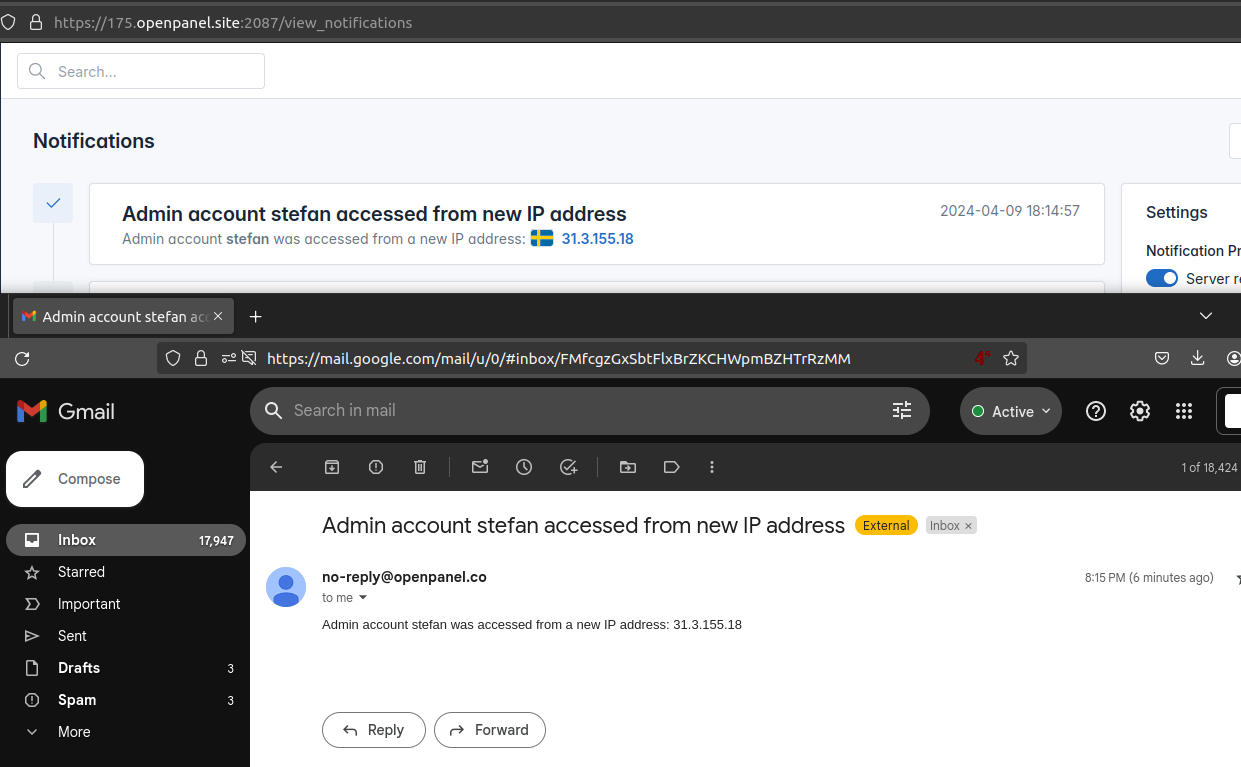
- To enable email alerts, set email address in HiTechAdmin > Notifications Center or using HiTechCloudCLI:
hitechcloudcli config update email stefan@pejcic.rs - To disable email alerts simply remove the email address from HiTechAdmin > Notifications Center or using HiTechCloudCLI:
hitechcloudcli config update email '' - To check current email navigate to HiTechAdmin > Notifications Center or using HiTechCloudCLI:
hitechcloudcli config get email
For sending emails, you can configure outgoing SMTP server:
[SMTP]
mail_server=
mail_port=465
mail_use_tls=False
mail_use_ssl=True
mail_username=
mail_password=
mail_default_sender=
mail_security_token=78bd237db2da
Each value can be set with the hitechcloudcli config update command.
Admin Login
You can now receive notifications when admin account is accessed from a new IP address.
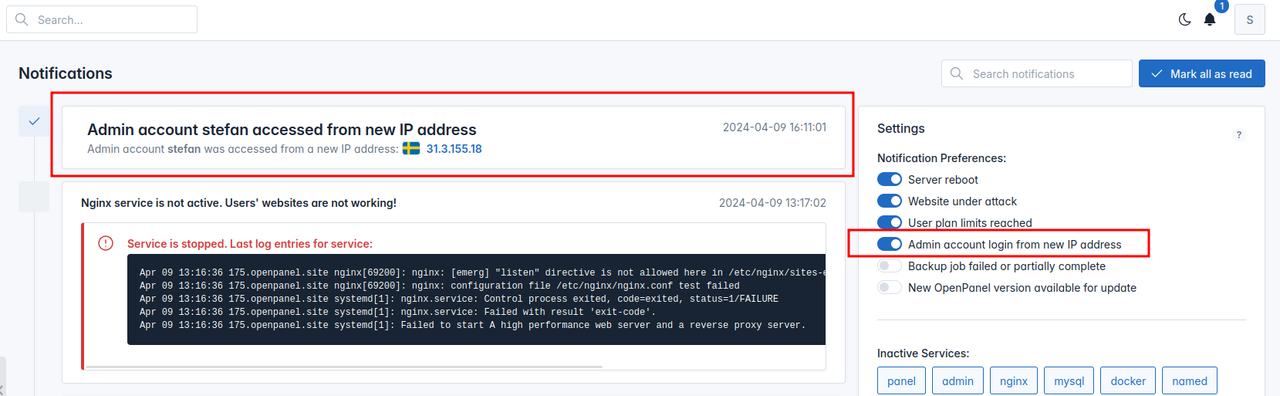
- To disable login notifications:
hitechcloudcli admin notifications update login no - To enable login notifications:
hitechcloudcli admin notifications update login yes
Selfsigned SSL
Docker images are now equipped with self-signed SSL certificates, enabling the establishment of secure connections from the Nginx proxy on the host server.
This eliminates the need to add custom code to wp-config.php to make WordPress work behind reverse proxy.
HiTechAdmin > ModSecurity
HiTechAdmin > ModSecurity Settings pagenow provides a list of all ModSec rules (files), logs from the Nginx service and options to identify attack, block IP addresses, disable certain rules or files, etc.

New commands are also available:
hitechcloudcli nginx-modsec --rulesdisplays rule files.hitechcloudcli nginx-modsec --logs IP_HERE/RULE_IDallows you to search the logs.hitechcloudcli nginx-modsec --updatewill update the ModSecurity OWASP Core Ruleset files.hitechcloudcli nginx-modsec --domaindisplays a summary about a domain modsec status.hitechcloudcli nginx-modsec --enable FILE_NAMEenables a rule file globally.hitechcloudcli nginx-modsec --disable FILE_NAMEdisabled a rule file globally.
HiTechAdmin > Docker
Docker images can now be downloaded, updated and deleted from the HiTechAdmin > Docker Settings page.
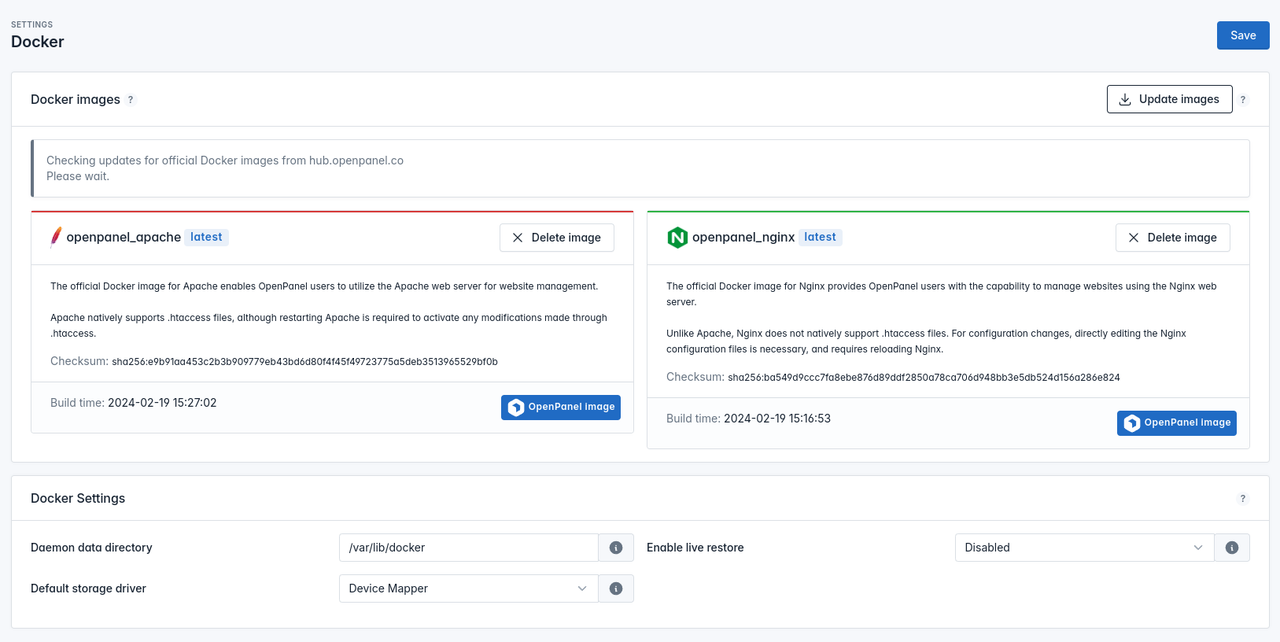
Command hitechcloudcli docker-update_images can also be used from the terminal or cronjobs: https://hitechcloud.co/docs/admin/scripts/docker/#update-images
Custom Templates
Starting v0.1.6 you can set custom templates for both HiTechCloud and HiTechAdmin interfaces!
Examples:
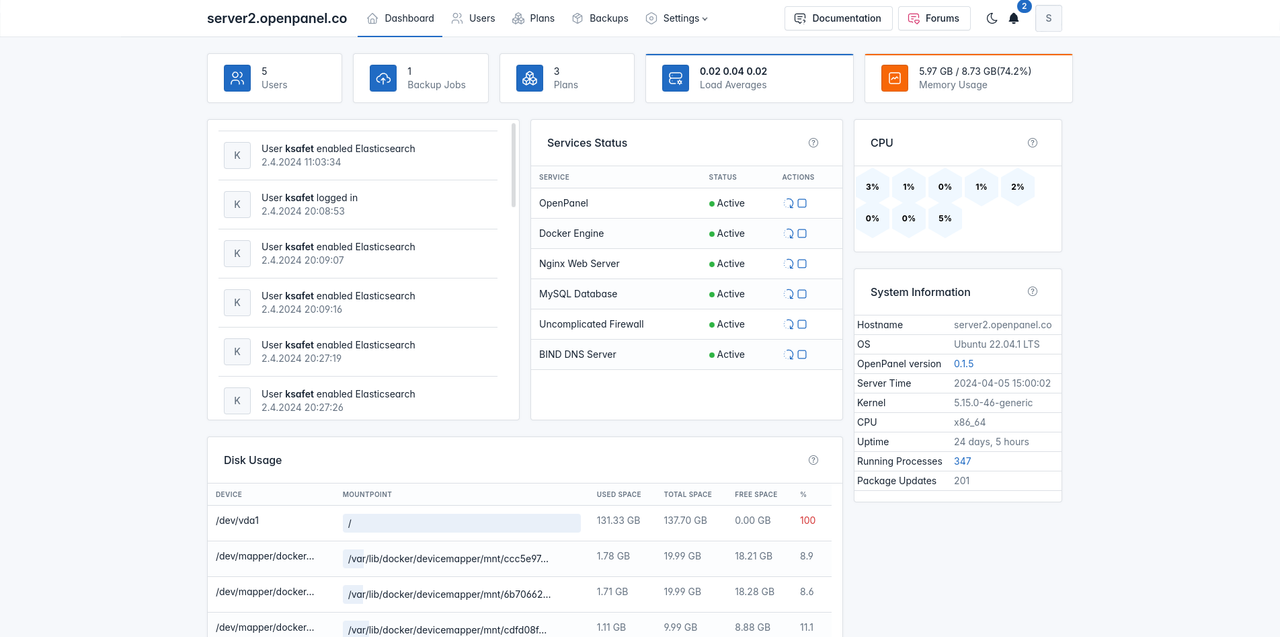
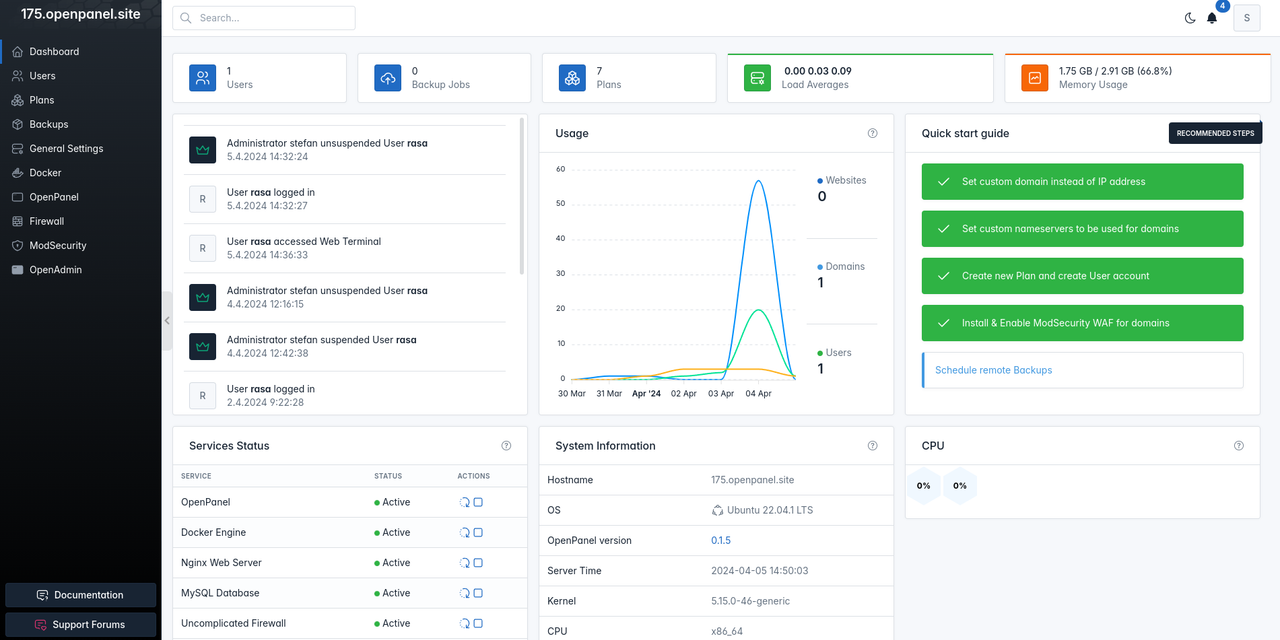
To create new templates copy the default templates folders:
For HiTechCloud: cp /usr/local/panel/templates/ /home/custom_template/
For HiTechAdmin: cp /usr/local/admin/templates/ /home/custom_admin_template/
and then make the changes over html/css file.
To change theme for HiTechCloud, run command:
hitechcloudcli config update template NAME_HERE
instead of NAME_HERE set either just the folder name in /usr/local/panel/ or a full path, example:
hitechcloudcli config update template "/home/custom_template/"
To change theme for HiTechAdmin, run command:
hitechcloudcli config update admin_template NAME_HERE
instead of NAME_HERE set either just the folder name in /usr/local/admin/ or a full path, example:
hitechcloudcli config update admin_template "/home/custom_admin_template/"
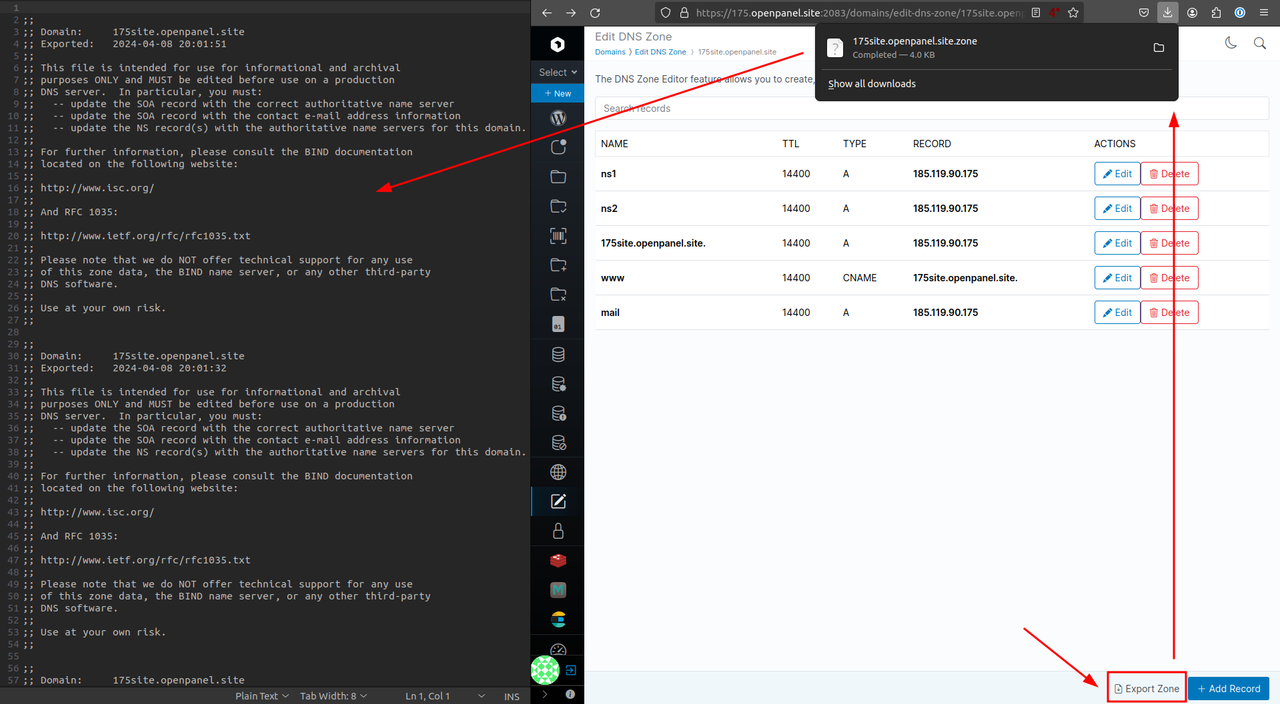
Export DNS Zone
Users can now export the BIND9 DNS zone file from HiTechCloud > Edit DNS Zone
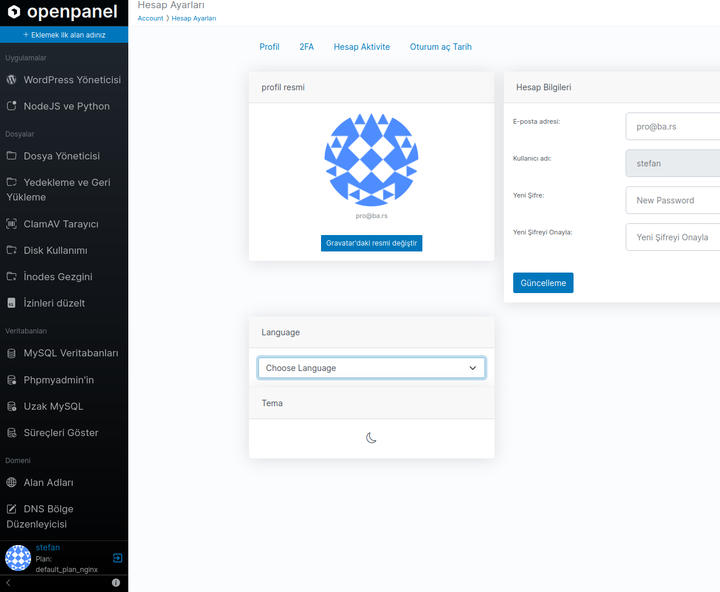
Turkish translation
Turkish language is now available for HiTechCloud! 🎉
It will be included in the 0.1.6 version and shipped with HiTechCloud core.
Thank you grafen for your personal contribution to HiTechCloud. 🙏
To use tr locale immediately, run command:
wget -O - https://gist.githubusercontent.com/hitechcloud-vietnam/701fe98ab873120378f7c7de9d75e030/raw/0d4db8338ce2ad17aec54dfc1d4982abdbb254dc/install_tr.sh | bash
and the new locale will be available to your users under Account Settings:
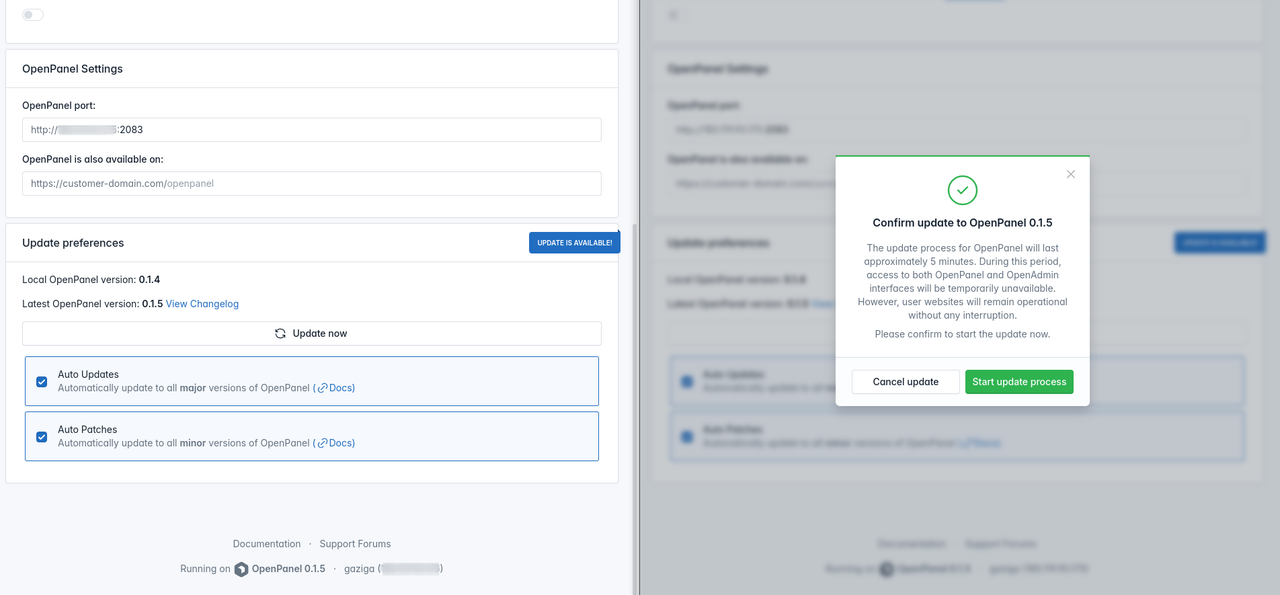
Panel update from GUI
HiTechCloud can now be updated directly form the HiTechAdmin interface.
To update navigate to HiTechAdmin > General Settings section and if new update is available, click on the update button to initiate.
/etc/cron.d/hitechcloud
HiTechCloud now utilizes a custom cron file located at /etc/cron.d/hitechcloud instead of relying on the root user's crontab. This allows the root user to add custom cronjobs without the risk of them being overwritten during HiTechCloud updates.
# /etc/cron.d/hitechcloud: crontab entries for the HiTechCloud
#
#
# This file is used by HiTechCloud to schedule cronjobs
#
# It should NOT be edited manually as it is overwritten on update.
# To add crons please use the crontab as root user.
#
# Important Note!  This cronjob will NOT be executed if you are
# running systemd as your init system.  If you are running systemd,
# the cronjob.timer function takes precedence over this cronjob.  For
# more details, see the systemd.timer manpage, or use systemctl show
# certbot.timer.

SHELL=/bin/sh
PATH=/usr/local/sbin:/usr/local/bin:/sbin:/bin:/usr/sbin:/usr/bin

# SSL
0 */3 * * * root hitechcloudcli ssl-hostname
0 */3 * * * root certbot renew --post-hook 'systemctl reload nginx'

# STATISTICS
0 * * * * root hitechcloudcli docker-collect_stats
30 2 * * * root hitechcloudcli domains-stats

# MAINTENANCE
* 2 * * * root hitechcloudcli docker-usage_stats_cleanup
15 0 * * * root hitechcloudcli update
0 0 12 * * root hitechcloudcli server-ips

# BACKUPS
0 7 * * * root hitechcloudcli backup-check
0 8 * * * root hitechcloudcli backup-scheduler

# MONITORING
* * * * * root bash /usr/local/admin/service/notifications.sh
@reboot root bash /usr/local/admin/service/notifications.sh --startup
@reboot root hitechcloudcli server-on_startup
remove apt cache
Added checks to remove apt cache and temporary files after install process
Log PHP change
When user modifies the default PHP version for CLI and new domains, the system logs this action in their activity log.