0.1.7
Released on May 08, 2024
🚀 New features
- French translation 🇫🇷
- WHMCS Module
- API endpoints for managing user accounts
- Cronjobs can now be enabled/disabled and run on demand
- Ubuntu 24.04 images
- Admin users can now be edited: rename, change password, suspend/unsuspend from HiTechAdmin interface
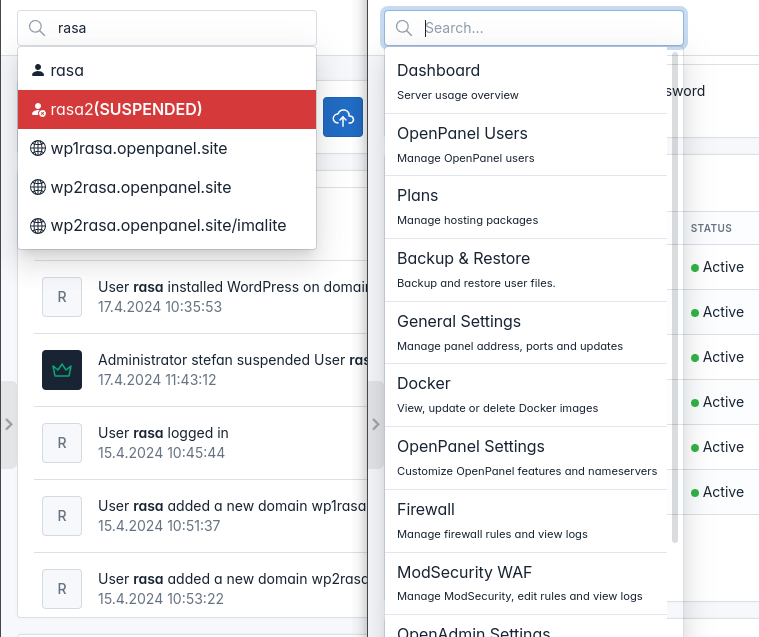
- HiTechAdmin search for users, websites and options
- Forbidden usernames list
💥 Breaking Changes
- Containerized services
- All services in our official docker images are now disabled by default
- Script
hitechcloudcli docker-is_port_in_useis now deprecated and will be removed in the future.
🐛 Bug fixes
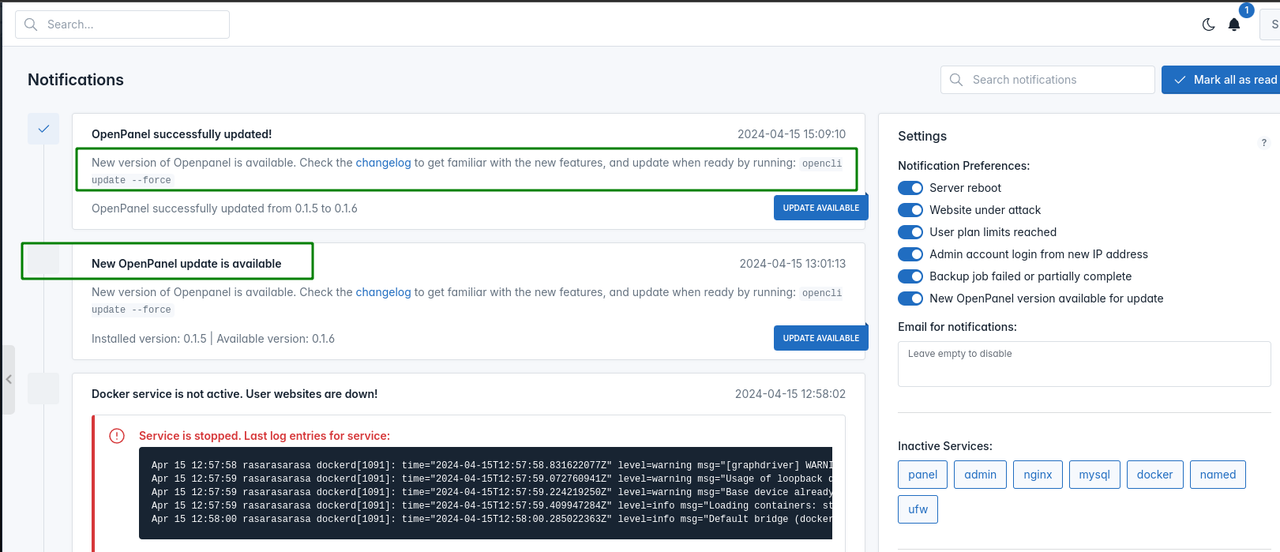
- Fixed bug with successful update message in notification center
- Fixed bug with email alerts not being sent if server does not have a valid ssl
- Fixed js error when there are no docker images on HiTechAdmin > Docker Settings
- Fixed bug where the system erroneously flagged initial admin login as a new admin login.
- Fixed bug in the update script where failed updates were being retried.
- Fixed bug with leftover DNS zones from domains removed while the Named service is down
- Fixed multiple bugs with the install script
- Fixed bug with pip install errors on python 3.11
- Fixed bug with Nginx service unable to start if network is down during the installation or if ip.hitechcloud.co is unreachable.
- Fixed bug with
hitechcloudcli adminreturning error instead of IPv4 address from external service. - Fixed false-positive error bug when adding user via HiTechAdmin interface.
- Fixed bug with search input on HiTechAdmin > Firewall page.
- Fixed bug with ajax form submission not working on HiTechAdmin > General Settings page (reported bySamanw).
- Fixed bug with docker:
failed to register layer: devicemapper: Error running deviceSuspend dm_task_run failed. - Fix bug with mysql:
ERROR 2013 (HY000): Lost connection to MySQL server at 'reading initial communication packet', system error: 2 - Fixed bug with PIP install on Python 3.11 and 3.12:
error: externally-managed-environment - Fixed bug with Gunicorn:
ModuleNotFoundError: No module named 'pyarmor_runtime_000000' - Fixed bug with Nginx:
Starting nginx: [emerg]: bind() to IP failed (99: Cannot assign requested address)
💅 Polish
- SSH service status is now restored after reboot
- Generate password button on HiTechAdmin > Users now toggles the password field visible.
- All images are now hosted locally.
- Google Cloud Storage is now used as a mirror for installation files.
- All docker images are now hosted on hub.docker.com
- Python 3.12 is now fully supported.
WHMCS Module
WHMCS module is now available for HiTechCloud. Currently supported actions are:
- ✅ create account
- ✅ change password
- ✅ suspend account
- ✅ unsuspend account
- ✅ terminate account
- ✅ autologin from frontend
- ✅ autologin from backend
- ❌ get disk usage for account
- ❌ change package
To setup WHMCS to use your HiTechCloud server follow these steps:
-
Enable API access on HiTechCloud server First make sure that API access is enabled by going to
HiTechAdmin > APIor by runninghitechcloudcli config get apifrom the terminal: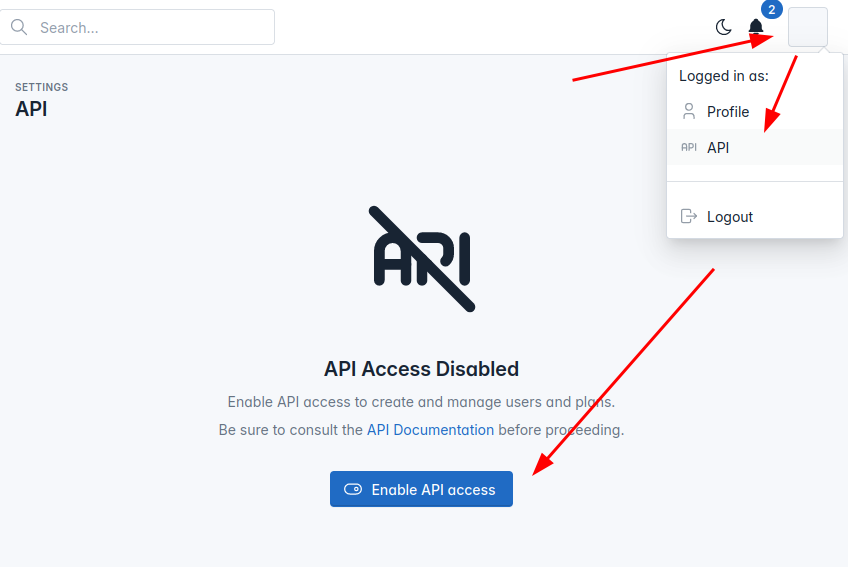 If API is not enabled, click on the "Enable API access" button or from terminal run
 hitechcloudcli config update api on.We recommend creating new Administrator user for API, to create a new user navigate to HiTechAdmin > HiTechAdmin Settings and create new admin user, or from terminal run:
hitechcloudcli admin new USERNAME_HERE PASSWORD_HERE -
Install HiTechCloud WHMC Module Login to SSH for WHMCS server Navigate to
path_to_whmcs/modules/serversRun this command to create a new folder and in it download the module:git clone https://github.com/hitechcloud-vietnam/hitechcloud-panel-whmcs-module.git hitechcloud -
Establish connection between the two servers On HiTechCloud server make sure that the HiTechAdmin port 2087 is open on
HiTechAdmin > Firewallor whitelist the IP adress of your WHMCS server. to whitelist ip address from terminal run:ufw allow from WHMCS_IP_HEREOn WHMCS server also make sure that the 2087 port is opened or whitelist the IP address of your HiTechCloud server. From WHMS navigate to: System Settings > Products & Services > Servers
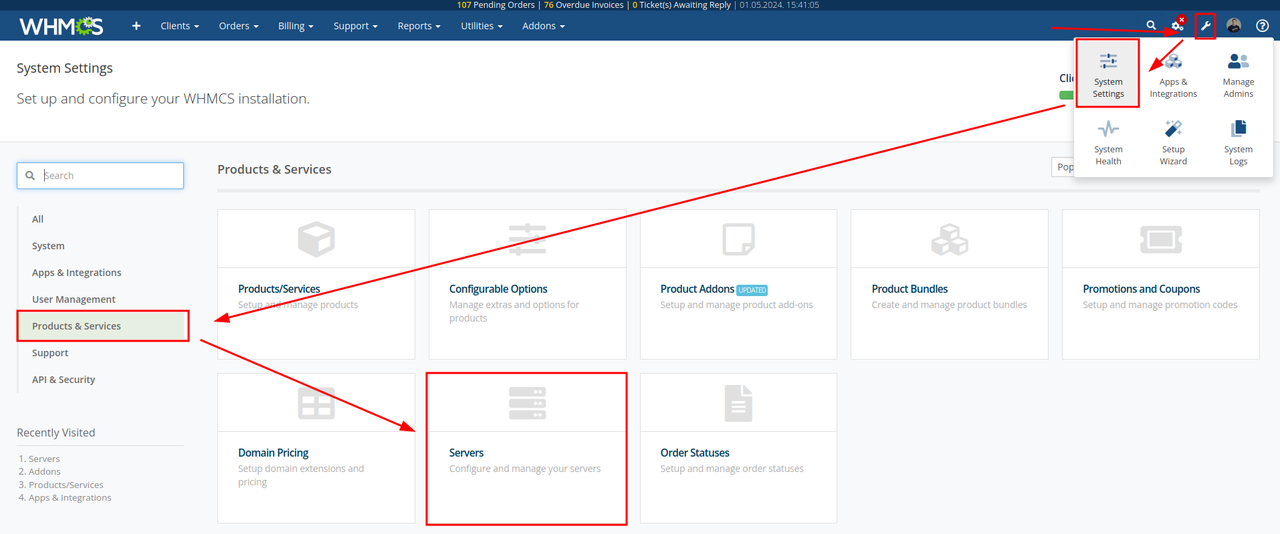 Click on Create New Server and under module select HiTechCloud then add HiTechCloud server IP, username and password for the HiTechAdmin panel:

-
Create hosting packages Hosting packages need to be created on both HiTechCloud and WHMCS servers. On HiTechCloud server login to admin panel and on
HiTechAdmin > Planscreate hosting packages that you will be assinging to users on WHMCS.
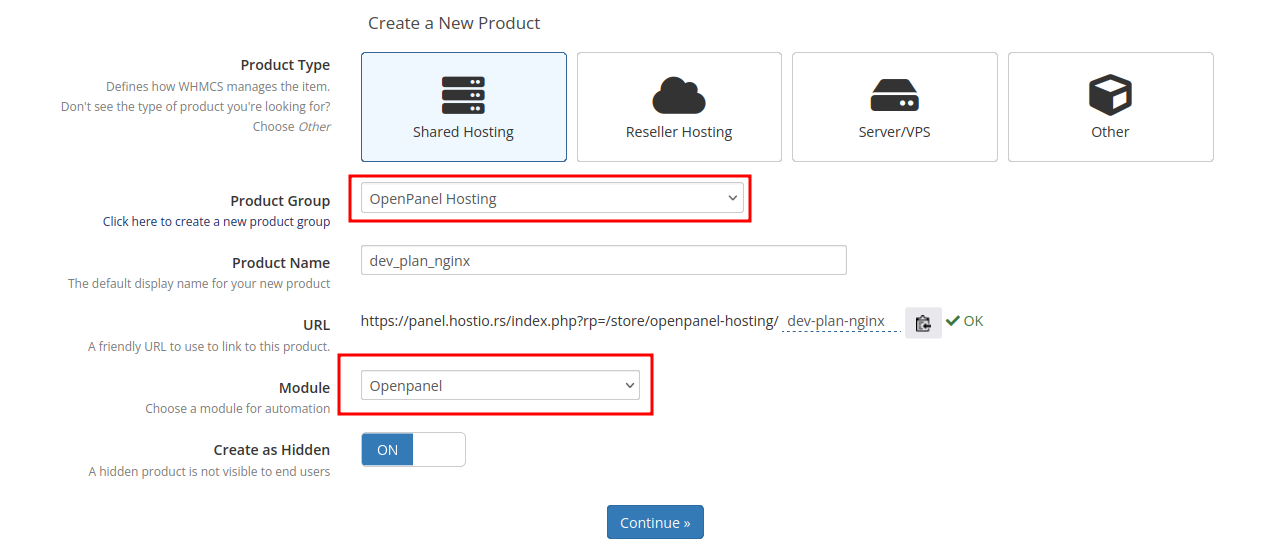
On the WHMCS server create first a new group and then create new plans under this group. When creating products, make sure to select HiTechCloud for Module and the newly created group
- Test creating new accounts Create an order and create a new order to test HiTechCloud API.
API for Users
New API endpoints are available for automating various administrative tasks or integrating with billing solutions.
- List accounts
curl -X GET http://PANEL:2087/api/users -H "Authorization: Bearer JWT_TOKEN_HERE"
- Create account
curl -X POST -H "Content-Type: application/json" -H "Authorization: Bearer JWT_TOKEN_HERE" -d '{"email": "EMAIL_HERE", "username": "USERNAME_HERE", "password": "PASSWORD_HERE", "plan_name": "PLAN_NAME_HERE"}' http://PANEL:2087/api/users
- Suspend account
curl -X PATCH -H "Content-Type: application/json" -H "Authorization: Bearer JWT_TOKEN_HERE" -d '{"action": "suspend"}' http://PANEL:2087/api/users/USERNAME_HERE
- Unsuspend account
curl -X PATCH -H "Content-Type: application/json" -H "Authorization: Bearer JWT_TOKEN_HERE" -d '{"action": "unsuspend"}' http://PANEL:2087/api/users/USERNAME_HERE
- Delete account
curl -X DELETE -H "Content-Type: application/json" -H "Authorization: Bearer JWT_TOKEN_HERE" http://PANEL:2087/api/users/USERNAME_HERE
- Change password
curl -X PATCH -H "Content-Type: application/json" -H "Authorization: Bearer JWT_TOKEN_HERE" -d '{"password": "NEW_PASSWORD_HERE"}' http://PANEL:2087/api/users/USERNAME_HERE
- Change plan
curl -X PUT -H "Content-Type: application/json" -H "Authorization: Bearer JWT_TOKEN_HERE" -d '{"plan_name": "PLAN_NAME_HERE"}' http://PANEL:2087/api/users/USERNAME_HERE
- Autologin
curl -X CONNECT -H "Content-Type: application/json" -H "Authorization: Bearer JWT_TOKEN_HERE" http://PANEL:2087/api/users/USERNAME_HERE
Improved install
gitandclamavare now removed from the install script- Added checks for failed wget (reported by germangc125)
--repairflag will now retry all installation steps- Port 22 is no longer disabled by default, only when flag
--no-sshis used. - database import is now retried multiple times if mysql is not ready
Cron disable
Users can now pause/unpause cronjobs and execute them out of schedule.
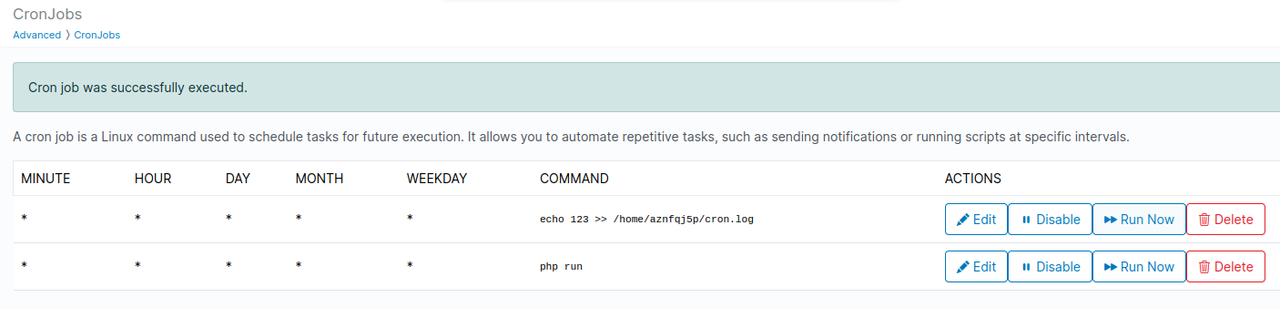
When troubleshooting cronjob, you can add >> /home/USERNAME/CRON.log 2>&1 in the cron command and output will be stored in the file everytime the cron is executed.
Edit Admin Users
Admin users can now be edited: rename, change password, suspend/unsuspend from HiTechAdmin interface.
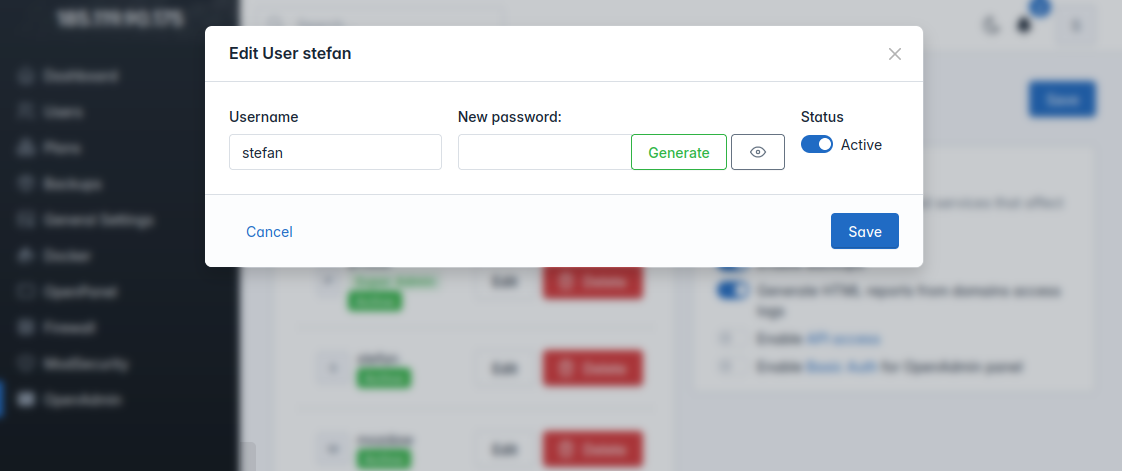
Note: Super admin role can not be suspended or deleted.
Admin search
HiTechAdmin has been enhanced with a search feature, enabling Administrators to swiftly navigate the HiTechAdmin interface and locate various items. This search functionality covers:
- Users
- Websites
- HiTechAdmin pages
Success message
Fixed bug with success message "HiTechCloud successfully updated!" not dismissing the "New HiTechCloud update is available" message.
Fixed bug with wrong description added for successfull update.
Skip version
Administrators now have the ability to specify which HiTechCloud versions to skip during updates by modifying the /etc/hitechcloud/upgrade/skip_versions file.
This feature proves handy when manually updating from an older version and wishing to skip certain intermediate versions.
For instance, if a user is updating from HiTechCloud 0.1.3 with autopatches disabled, the update process would typically progress from 0.1.4 to 0.1.5, then to 0.1.6, and finally to the latest version, 0.1.7.
However, if there are minimal differences between versions 0.1.4 and 0.1.5, an admin can opt to skip version 0.1.4 by appending it to the /etc/hitechcloud/upgrade/skip_versions file:
echo 0.1.4 >> /etc/hitechcloud/upgrade/skip_versions
Consequently, during the update procedure, specified version 0.1.4 will be skipped.
It's worth noting that while skipping versions is possible, it's generally not recommended since each update typically takes around 30 seconds.
In the event of a failed update to a particular version, the hitechcloudcli update scripts will automatically add that version to the /etc/hitechcloud/upgrade/skip_versions file to prevent future attempts at updating to it.
Forbidden Username
Both hitechcloudcli user-add and hitechcloudcli user-rename scripts now use an external list of forbidden names from: /usr/local/admin/scripts/helpers/forbidden_usernames.txt file. Administrators can add usernames to this list.
test
restart
reboot
shutdown
exec
root
admin
ftp
lsws
litespeed
1000
vsftpd
apache2
apache
nginx
php
mysql
mysqld
www-data
hitechcloud
SSH after reboot
SSH service inside users docker containers is disabled by default when account is created, and in HiTechCloud < 0.1.6 was also disabled by default when server is rebooted.
We now store the ssh service status for each user and if enabled, after reboot will be re-enabled. note: ssh service for users uses a random port, so after reboot the port is changed.
hub.docker.com
HiTechCloud official docker images are now hosted on hub.docker.com
- Nginx stack: https://hub.docker.com/r/hitechcloud/nginx/tags
- Apache stack: https://hub.docker.com/r/hitechcloud/apache/tags
Disabled services
In order to reduce the memory footprint of Docker containers, we are implementing breaking changes to our official Docker images for Nginx and Apache:
- NodeJS, Python, PM2, and WP-CLI are removed from the images. They are installed only when needed: when a user adds a WordPress website or a Node.js/Python application.
- All services are disabled by default and will only be enabled when needed. MySQL is enabled when adding the first database or user, webservers are started only when a domain is added, SSH only when SSH access is enabled, cron service after cronjob is added, etc.
This ensures that only the services that are actually used are running.
With these changes, we managed to lower idle CPU & Memory Usage of new user accounts from 680MB to less than 10MB.
Ubuntu24 images
Both official images hitechcloud/nginx and hitechcloud/apache now use Ubuntu 24.04 as the base images. This change fixes 16 vulnerabilities in the previous Ubuntu 22.04 docker image.
Containerized services
MySQL service is now also run as a docker container. This allows Admins to set cpu and memory limits for the service, as well to easily manage backup and restore.
Example, restart mysql container:
docker restart hitechcloud_mysql
Example, backup mysql data locally:
docker run --rm \
--mount source=hitechcloud_mysql_data,target=<target> \
-v $(pwd):/backup \
busybox \
tar -czvf /backup/<backup-filename>.tar.gz <target>
Example, backup mysql data to AWS:
docker run --rm \
  -v hitechcloud_mysql_data:/var/lib/mysql \
  --env AWS_ACCESS_KEY_ID="<xxx>" \
  --env AWS_SECRET_ACCESS_KEY="<xxx>" \
  --env AWS_S3_BUCKET_NAME="<xxx>" \
  --entrypoint backup \
  offen/docker-volume-backup:v2