0.1.9
Released on May 31, 2024
🚀 New features
- Remote API is now used by default for Websites Screenshots
- HiTechAdmin Notifications Center is now using Sentinel service
- IPset Blacklists for UFW
- Restrict access to Cloudflare only with a single click
- HiTechCloud FTP - FTP module for HiTechCloud (BETA)
- HiTechMail - Emails module for HiTechCloud (BETA)
hitechcloudcli faqcommand to show frequently asked questions
🐛 Bug fixes
- Fixed 500 error on
/domains/edit-dns-zonecaused by the 0.1.7 update. - Fixed bugs with
hitechcloudcli admin onandhitechcloudcli admin offcommands. - Fixed bug with escaping
!character in mysql database and user names. - Fixed css bug in the menu that caused the HiTechAdmin > Notifications link not to be shown on mobile.
- Fixed bug with
hitechcloudcli reportthat failed to retrive MySQL version for mysql running inside docker container. - Fixed bug with incorect version in changelog link on HiTechAdmin > General Settings > Update Preferences.
- Fixed bug with
hitechcloudcli updatescript failing due tojqmissing on OS. - Fixed js error on HiTechAdmin > CPU & RAM Usage pages.
- Fixed 500 error on HiTechAdmin > Docker page caused by the 0.1.8 update.
- Fixed bug with usermod when creating users via
hitechcloudcli user-addcommand. - Fixed bug with WHMCS module not changing user plan due to whmcs passing plan_name instead of plan_id.
- Fixed bug with nginx default vhost file missing on account creation.
💅 Polish
- Install script now accepts
--hostname=flag. - Custom SSH Welcome message
www.<DOMAIN_NAME>is now automatically added as alias for new domains.hitechcloudcli user-addhitechcloudcli user-change_planandhitechcloudcli plan-createscripts now use plan name instead of plan id.- Working server time on HiTechAdmin > Dashboard.
- CPU type information on HiTechAdmin > Dashboard.
- Cloudflare IP addresses are now highlighted in HiTechAdmin > Firewall
- Install script now supports optional flags
--skip-blacklists,--enable_ftpand--enable_mailto enable experimental features. hitechcloudcli -vis now an alias forhitechcloudcli --version.hitechcloudcli admincommand now acceptslogandhelpflags.- Added detailed usage with examples for
hitechcloudcli admincommand. - HiTechCloud API now also uses the forbidden_usernames.txt* file.
- Pre-fill HiTechAdmin > Plans > New form
Screenshots API
Starting 0.1.9, the Playwright service is no longer installed on the server for generating website screenshots. Instead, the remote screenshots API is utilized, and images are served from it. This change will conserve up to 1GB of additional disk space previously required for the Playwright service on each server. Additionally, it will decrease CPU consumption since screenshots are no longer generated locally but served from another server.
- For new installations: By default, the
http://screenshots-api.hitechcloud.co/API is used. Administrators can specify any other third-party API during installation using--screenshots=LINK_HERE. Alternatively, they can install the local Playwright service with--screenshots=local. - For existing installations: Upon upgrade, the default screenshots service will be changed from local to
http://screenshots-api.hitechcloud.co/. Administrators can modify the API by using the terminal command:hitechcloudcli config update screenshots NEW_LINK_HERE, or they can keep using the existing local service using:hitechcloudcli config update screenshots local.
FTP
New experimental HiTechCloud FTP module is now available and allows you to create FTP sub-accounts.
Upon activation, a fresh Docker container featuring VSFTPD will be initiated, serving as a shared environment for all HiTechCloud FTP sub-users. This ensures the segregation of FTP accounts from other processes and services. Even in the event of a compromise, the impact is contained within the confines of the HiTechCloud user's home folder, preventing access to other services or files.
This functionality leverages the open-source HiTechCloud FTP module and is currently in its preliminary developmental phase. As such, it is not enabled by default and there are no additional options available in the HiTechCloud interface to facilitate the creation and management of FTP users. Currently, all configurations must be performed by the administrator via the terminal:
To install FTP on an HiTechCloud server, execute the following command:
hitechcloudcli ftp-setup
To create new FTP accounts:
hitechcloudcli ftp-add <NEW_USERNAME> <NEW_PASSWORD> <FOLDER> <HITECHCLOUD_USERNAME>
After detailed testing, a dedicated FTP page will be introduced to the HiTechCloud, enabling users to seamlessly create FTP sub-users.
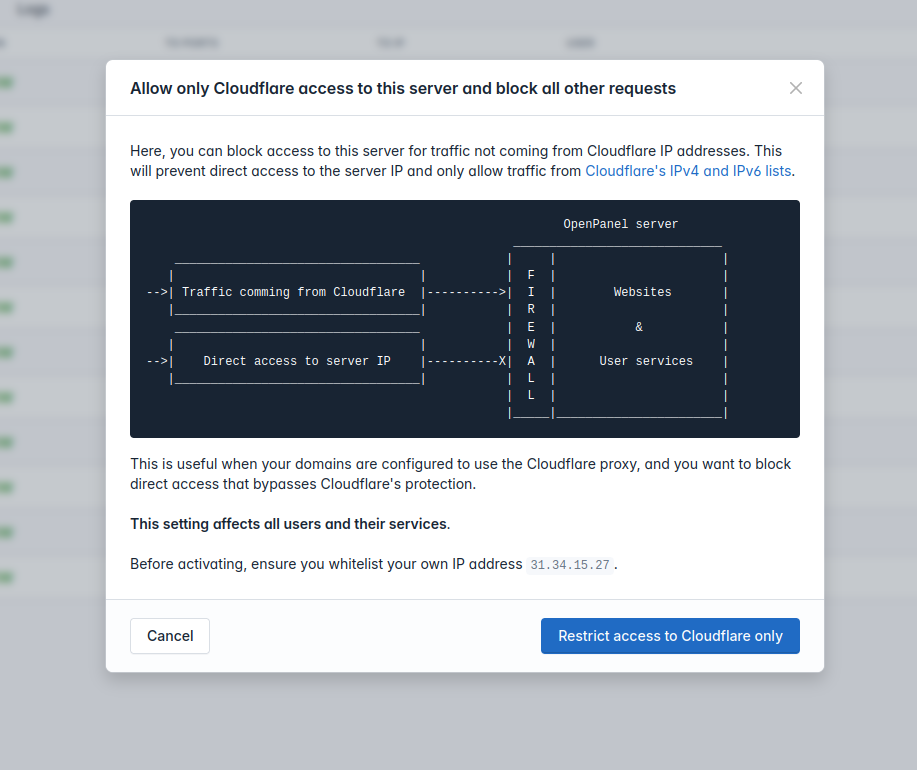
Cloudflare only
Administrators can now disable direct server access and only allow access via Cloudflare proxy.
                                                          HiTechCloud server
                                                   _____________________________
    __________________________________            |     |                       |
   |                                  |           |  F  |                       |
-->| Traffic comming from Cloudflare  |---------->|  I  |        Websites       |
   |__________________________________|           |  R  |                       |
    __________________________________            |  E  |           &           |
   |                                  |           |  W  |                       |
-->|    Direct access to server IP    |----------X|  A  |      User services    |
   |__________________________________|           |  L  |                       |
                                                  |  L  |                       |
                                                  |_____|_______________________|
To enable this feature simply navigate to HiTechAdmin > Firewall and click on the Cloudfare button.
IPset Blacklists
HiTechAdmin Firewall now allows Administrators to easily add blacklists to block IP addresses from known malicious sources.
This feature uses the ipset-blacklist service automating the process of fetching and blocking IPs. It's a simple yet effective way to enhance system security without manual hassle.
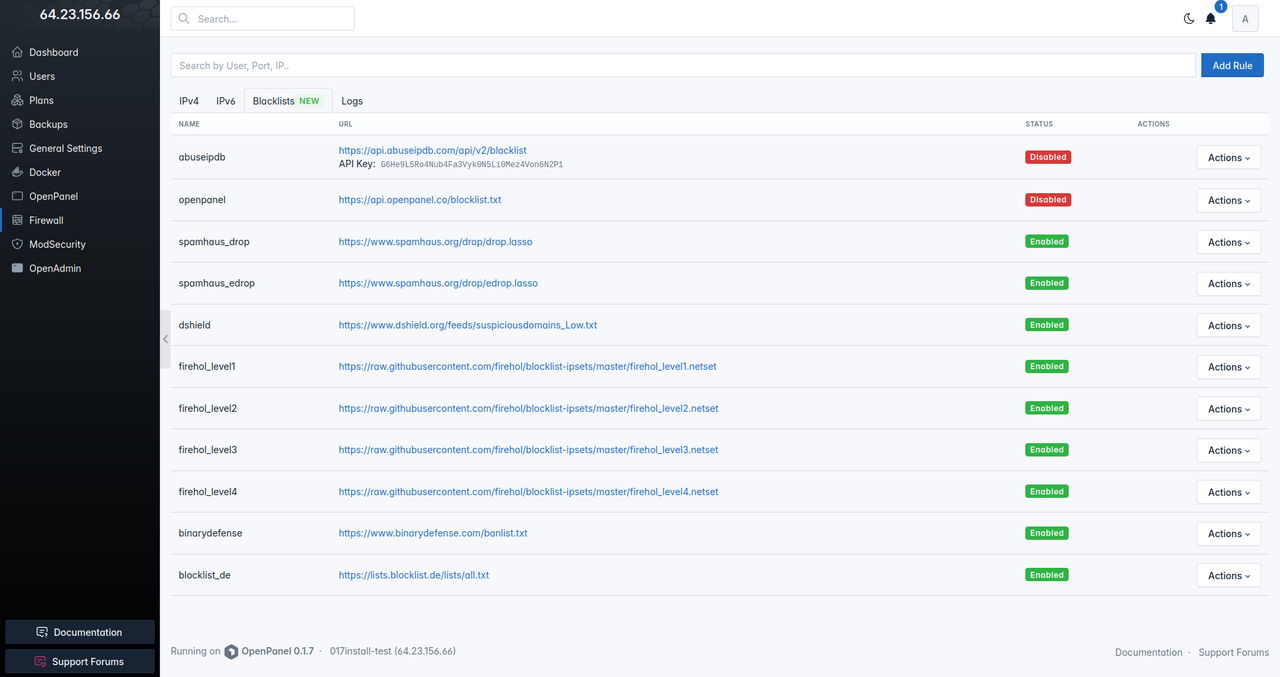
Default blacklists:
| Blacklist | URL |
|---|---|
| AbuseIPDB (DISABLED) | https://api.abuseipdb.com/api/v2/blacklist |
| HiTechCloud (DISABLED) | https://api.hitechcloud.co/blocklist.txt |
| Spamhaus DROP | https://www.spamhaus.org/drop/drop.lasso |
| Spamhaus EDROP | https://www.spamhaus.org/drop/edrop.lasso |
| DShield | https://www.dshield.org/feeds/suspiciousdomains_Low.txt |
| FireHOL level1 | https://raw.githubusercontent.com/firehol/blocklist-ipsets/master/firehol_level1.netset |
| FireHOL level2 | https://raw.githubusercontent.com/firehol/blocklist-ipsets/master/firehol_level2.netset |
| FireHOL level3 | https://raw.githubusercontent.com/firehol/blocklist-ipsets/master/firehol_level3.netset |
| FireHOL level4 | https://raw.githubusercontent.com/firehol/blocklist-ipsets/master/firehol_level4.netset |
| Binary Defense | https://www.binarydefense.com/banlist.txt |
| blocklist.de | https://lists.blocklist.de/lists/all.txt |
Administrators can add additional blacklists.
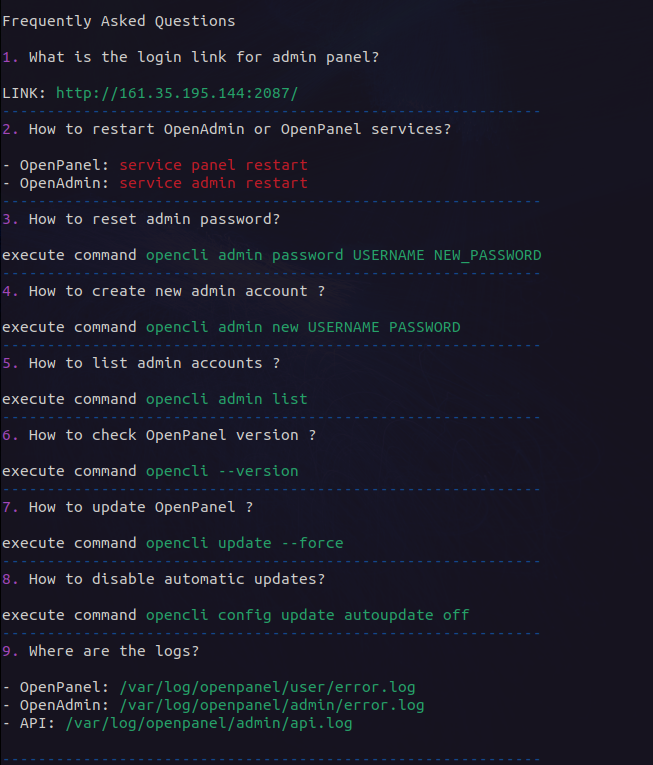
hitechcloudcli faq
HiTechCloudCLI now has a new command hitechcloudcli faq to display most frequently asked questions:
/etc/hitechcloud/
To enable easier updates in the future, we are gradually migrating all configuration files from /usr/local/panel/ & /usr/local/admin/ directories to the new /etc/hitechcloud/ directory.
This will separate configuration files in /etc/ from all the code in /usr/ and therefore no configuration files will need to be moved&restored when performing updates.
Current changes include:
- Forbidden usernames file is now moved from:
/usr/local/admin/scripts/helpers/forbidden_usernames.txtto/etc/hitechcloud/hitechadmin/config/forbidden_usernames.txt - FTP configuration files are stored under
/etc/hitechcloud/ftp/users/ - Template to prefill Plan Form is now moved from
/usr/local/admin/conf/new_plan_templateto/etc/hitechcloud/hitechadmin/config/new_plan_template
SSH Welcome
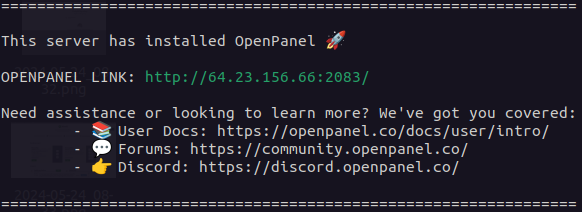
A welcome message is shown to administrators upon logging into the server. The message currently displays HiTechCloud version, admin link and help links. In the future it will also check for HiTechCloud updates and display reminders.
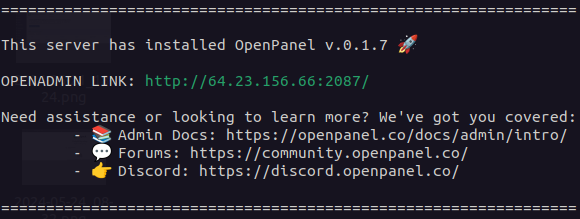
Custom SSH welcome message is also shown to HiTechCloud users upon logging into the server. This message can be customized by the Administrator.
Prefill Plan

To pre-fill data into the new plan form, simply create a new file:
/etc/hitechcloud/hitechadmin/config/new_plan_template
and set the data to be used:
{
  "name": "Starter Plan",
  "description": "Basic starter plan for new users.",
  "docker_image": "apache",
  "domains": 5,
  "websites": 3,
  "databases": 2,
  "ram": 2,
  "cpu": 1,
  "port_speed": 100,
  "disk_limit_for_docker": 10,
  "inodes_for_storage_file": 500000,
  "disk_limit_for_storage_file": 20
}
hostname flag
Install script now accepts --hostname= flag to set the provided hostname on the server and set it for accessing both HiTechCloud and HiTechAdmin interfaces. The hostname must be a Fully qualified domain name.
Example:
bash <(curl -sSL https://get.hitechcloud.co/) --hostname=server.hitechcloud.site