Feature Manager
The Feature Manager allows administrators to enable or disable specific features (pages) within the HiTechCloud UI. This is useful for customizing the control panel experience based on user roles, security policies, or hosting plans.
Enabled/disabled features are grouped into Feature Sets - named collections of toggles that are then assigned to a hosting plan. Each feature set is its own list, so different plans can expose a different set of pages to their users.
Navigating the Feature Manager
Go to HiTechAdmin > Hosting Plans > Feature Manager. The index page has two sections:
- Create - type a name and click Create to create a new, empty feature set.
- Manage - pick an existing feature set from the Manage feature set dropdown to open and edit it.
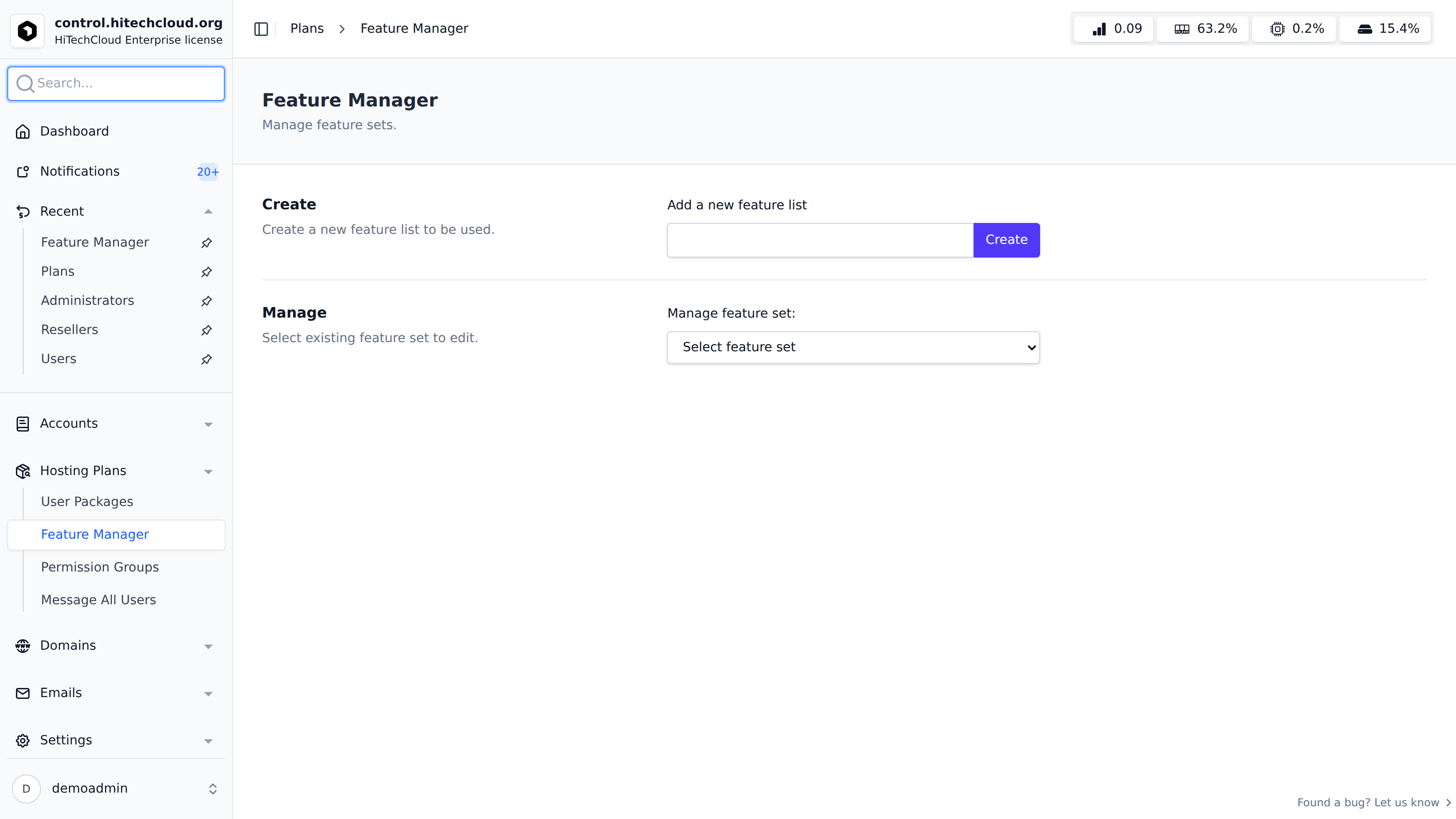
Selecting or creating a feature set opens its edit page, where every available feature is listed in a table:
| Column | Description |
|---|---|
| Status | Toggle switch to enable/disable the feature for this feature set. |
| Name | Feature title and a short description. |
| Type | Community, Enterprise, or Beta. Enterprise features can only be toggled on when an Enterprise license is active - otherwise the toggle is disabled. |
| Page | The HiTechCloud page/route the feature controls. |
| Module | Whether the underlying module is enabled. If it shows Disabled, the feature has no effect for users even when toggled on here - click it to go enable the module. |
Use the search box to filter features by name or description, and Enable All / Disable All to toggle every feature at once. Click Save to apply your changes - they take effect for users on plans assigned to this feature set right away. The default feature set cannot be deleted, and a feature set that is currently assigned to a hosting plan cannot be deleted either.
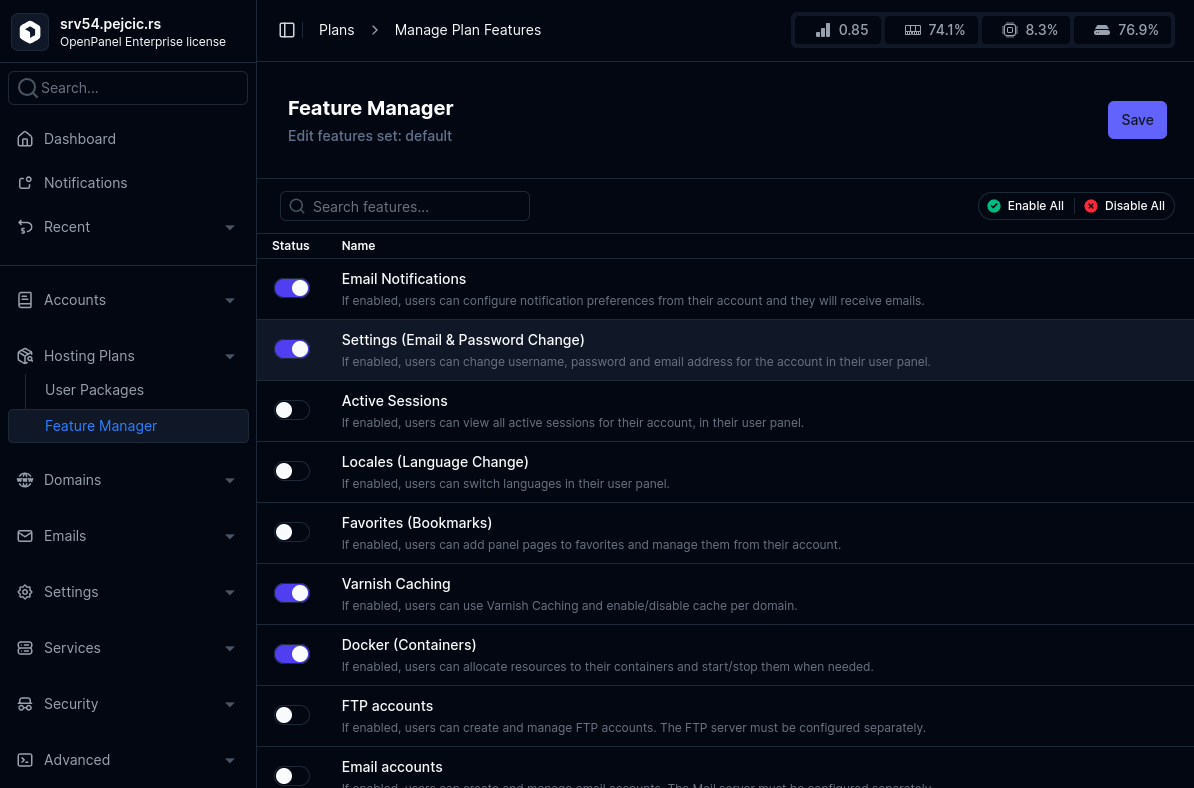
Available Features
| Name | Page | Type | Description |
|---|---|---|---|
| Email Notifications | /account/notifications | Community | If enabled, users can configure notification preferences from their account and they will receive emails. |
| Settings (Email & Password Change) | /account/settings | Community | If enabled, users can change username, password and email address for the account in their user panel. |
| Active Sessions | /account/sessions | Community | If enabled, users can view all active sessions for their account, in their user panel. |
| Locales (Language Change) | /account/languages | Community | If enabled, users can switch languages in their user panel. |
| Favorites (Bookmarks) | /account/favorites | Community | If enabled, users can add panel pages to favorites and manage them from their account. |
| Varnish Caching | /cache/varnish | Community | If enabled, users can use Varnish Caching and enable/disable cache per domain. |
| Docker (Containers) | /containers | Enterprise | If enabled, users can allocate resources to their containers and start/stop them when needed. |
| Web Terminal | /containers/terminal | Enterprise | If enabled, users can open an interactive shell inside their containers from the user panel. |
| Change Container Image Tag | /containers/image/change | Enterprise | If enabled, users can change the image tag used by a container from the user panel. |
| Switch WebServer | /containers/webserver | Enterprise | If enabled, users can switch the webserver used for their account from the user panel. |
| Switch MySQL Type | /containers/mysql | Enterprise | If enabled, users can switch between MySQL and MariaDB for their account from the user panel. |
| FTP accounts | /ftp | Enterprise | If enabled, users can create and manage FTP accounts. The FTP server must be configured separately. |
| SSH keys | /ssh-keys | Community | If enabled, users can manage the public keys that may sign in over SSH and SFTP as their own account. |
| Webmail (Roundcube) | /webmail | Enterprise | If enabled, users can auto-login to webmail (Roundcube) for email accounts. The Roundcube service must be configured separately. |
| Email accounts | /emails | Enterprise | If enabled, users can create and manage email accounts. The Mail server must be configured separately. |
| Email Deliverability | /emails/deliverability | Enterprise | If enabled, users can check SPF, DKIM and DMARC for their domains. |
| Email Filters | /emails/filter | Enterprise | If enabled, users can configure filters and forwarders for their emails. |
| Email Aliases | /emails/aliases | Enterprise | If enabled, users can manage aliases (forward from non-existing address). |
| Address Importer | /emails/import | Enterprise | If enabled, users can import email addresses from a CSV file. |
| Address Exporter | /emails/export | Enterprise | If enabled, users can export email addresses into a CSV file. |
| Default Address | /emails/default | Enterprise | If enabled, users can create default (catch-all) email addresses. |
| Email Forwarders | /emails/forwarders | Enterprise | If enabled, users can forward a mailbox to other addresses, with or without keeping a copy in the mailbox. |
| Blocked Senders | /emails/blocklist | Enterprise | If enabled, users can refuse or always accept mail from an address or a whole domain, per domain or per mailbox. |
| Adjustable Spam Filter | /emails/spam-filter | Enterprise | If enabled, users can set the spam score at which mail is filtered for their domains, and whether it is tagged, filed into Junk, or refused. |
| Greylisting | /emails/greylisting | Enterprise | If enabled, users can see whether greylisting is on and turn it off for one of their domains. The delay itself is server-wide and set by the administrator. |
| Email Disk Usage | /emails/disk-usage | Enterprise | If enabled, users can see how much disk each mailbox uses against its quota, and which folders account for it. |
| Calendars and Contacts | /emails/dav/configure | Enterprise | If enabled, users can see the CalDAV and CardDAV addresses for each of their mailboxes, and what to type into iOS, macOS, Thunderbird and DAVx5. |
| Manage Calendars | /emails/dav/manage | Enterprise | If enabled, users can create, rename, recolour and delete the calendars and address books on their mailboxes. |
| Calendar Sharing | /emails/dav/sharing | Enterprise | If enabled, users can share a calendar or address book with another mailbox on the same account, to read or to change, and take the share back. |
| MySQL | /mysql | Community | If enabled, users can manage MySql databases and users. |
| Remote MySQL | /mysql/remote-mysql | Community | If enabled, users can enable/disable remote access to MySQL databases. |
| Import MySQL Databases | /mysql/import | Community | If enabled, users can import .sql files into MySQL databases from their user panel. |
| MySQL Configuration | /mysql/configuration | Community | If enabled, users can edit MySQL Configuration from their user panel. |
| MySQL Process List | /mysql/processlist | Community | If enabled, users can view MySQL processlist from the user panel. |
| MySQL Root Password | /mysql/root-password | Community | If enabled, users can change password for their MySQL root user from the user panel. |
| PostgreSQL | /postgresql | Enterprise | If enabled, users can manage PostgreSQL databases and users. |
| Remote PostgreSQL | /postgresql/remote-postgresql | Enterprise | If enabled, users can enable/disable remote access to PostgreSQL databases. |
| Import PostgreSQL Databases | /postgresql/import | Enterprise | If enabled, users can import .sql files into PostgreSQL databases from their user panel. |
| PostgreSQL Configuration | /postgresql/configuration | Enterprise | If enabled, users can edit PostgreSQL Configuration from their user panel. |
| pgAdmin | /postgresql/pgadmin | Enterprise | If enabled, users can manage pgAdmin and use it to connect to their Postgres databases. |
| PHP | /php | Community | If enabled, users can change PHP version for domains, set limits and set default version for new domains. |
| PHP Options | /php/options | Community | If enabled, users can edit configured PHP.INI directives using the Options page. |
| PHP X-Ray | /php/xray | Community | If enabled, users can see where their PHP is spending its time: the call stack of every request that ran long, and what each PHP worker is doing right now. |
| PHP.INI Editor | /php/ini | Community | If enabled, users can edit directly the PHP.INI file for any PHP version from their HiTechCloud. |
| PHP Extensions | /php/extensions | Beta | If enabled, users can manage extensions for their PHP versions. |
| phpMyAdmin | /mysql/phpmyadmin | Community | If enabled, users can manage phpMyAdmin and use it to connect to their MySQL databases. |
| Cronjobs | /cronjobs | Community | If enabled, users can configure cronjobs. |
| Backups | /backups | Beta | If enabled, users can configure backups. |
| Backup Wizard | /backup-wizard | Community | If enabled, users can generate and download a full account backup. |
| WordPress | /wordpress | Community | If enabled, WordPress can be installed using the Autoinstaller and users can use the WP Manager to manage websites. |
| Drupal | /drupal/install | Beta | If enabled, Drupal can be installed using the Autoinstaller and users can use the Site Manager to manage websites. |
| Flarum | /flarum/install | Beta | If enabled, Flarum can be installed using the Autoinstaller and users can use the Site Manager to manage websites. |
| SofaWiki | /sofawiki/install | Beta | If enabled, SofaWiki can be installed using the Autoinstaller and users can use the Site Manager to manage websites. |
| TinyPhotoGallery | /tinyphotogallery/install | Beta | If enabled, TinyPhotoGallery can be installed using the Autoinstaller and users can use the Site Manager to manage websites. |
| TinyFileManager | /tinyfilemanager/install | Beta | If enabled, TinyFileManager can be installed using the Autoinstaller and users can use the Site Manager to manage websites. |
| OJS | /ojs/install | Beta | If enabled, Open Journal Systems can be installed using the Autoinstaller and users can use the Site Manager to manage websites. |
| MediaWiki | /mediawiki/install | Beta | If enabled, MediaWiki can be installed using the Autoinstaller and users can use the Site Manager to manage websites. |
| DokuWiki | /dokuwiki/install | Beta | If enabled, DokuWiki can be installed using the Autoinstaller and users can use the Site Manager to manage websites. |
| phpBB | /phpbb/install | Beta | If enabled, phpBB can be installed using the Autoinstaller and users can use the Site Manager to manage websites. |
| OpenCart | /opencart/install | Beta | If enabled, OpenCart can be installed using the Autoinstaller and users can use the Site Manager to manage websites. |
| PrestaShop | /prestashop/install | Beta | If enabled, PrestaShop can be installed using the Autoinstaller and users can use the Site Manager to manage websites. |
| NextCloud | /nextcloud/install | Beta | If enabled, NextCloud can be installed using the Autoinstaller and users can use the Site Manager to manage websites. |
| Matomo | /matomo/install | Beta | If enabled, Matomo can be installed using the Autoinstaller and users can use the Site Manager to manage websites. |
| Moodle | /moodle/install | Beta | If enabled, Moodle can be installed using the Autoinstaller and users can use the Site Manager to manage websites. |
| Joomla | /joomla/install | Beta | If enabled, Joomla Content Management System (CMS) can be installed using the Autoinstaller and managed via Site Manager. |
| Website Builder | /website-builder | Community | If enabled, users can create HTML websites using the GrapeJS drag-drop editor. |
| Python Applications | /python | Enterprise | If enabled, containerized Python applications can be setup from the Autoinstaller. |
| PM2 Process Manager | /nodejs | Community | If enabled, users can manage the PM2 processes behind their Node.js, Python, Ruby, Java and Bun applications. |
| NodeJS Applications | /nodejs | Enterprise | If enabled, containerized NodeJS applications can be setup from the Autoinstaller. |
| Ruby Applications | /ruby | Enterprise | If enabled, containerized Ruby applications can be setup from the Autoinstaller. |
| Java Applications | /java | Enterprise | If enabled, containerized Java applications can be setup from the Autoinstaller. |
| AutoInstaller | /auto-installer | Community | If enabled, users can use the Auto-Installer page to manage websites and install applications. |
| Disk Usage Explorer | /disk-usage | Enterprise | If enabled, users can access the Disk Usage page to browse current disk usage per directories. |
| Inodes Explorer | /inodes-explorer | Enterprise | If enabled, users can access the Inodes Usage page to browse current inodes usage per directories. |
| Resources Usage | /usage | Community | If enabled, docker stats are collected for containers and users can browse the data using the Resource Usage page |
| Server Info | /server/info | Community | If enabled, users can view their hosting plan limits and server information on Server Information page. |
| Multi-WebServer Hosting | /server/multiweb | Community | If enabled, users can choose the web server (nginx, Apache or OpenLiteSpeed) each of their websites runs on, and switch it later from the Multi-WebServer page. |
| Webserver Configuration | /server/webserver_conf | Community | If enabled, users can edit the Nginx/Apache configuration for their webserver containers. |
| Website Firewall | /server/waf | Enterprise | If enabled, users can put each of their websites into off, detect-only or enforcing mode, see what the firewall has blocked recently and why, and let through a rule that is catching their own traffic. Turning the firewall on or off for the whole server stays here, under Security. |
| File Manager | /files | Community | If enabled, users have access to the File Manager interface to manage website files (/var/www/html/ directory). Disable this feature for 'Email-only' or 'DNS-only' plans. |
| Trash | /files.trash | Enterprise | If enabled, users can view and manage Trash folder. |
| ClamAV (Malware Scanner) | /malware-scanner | Enterprise | If enabled, ClamAV service is started and users can scan run scans. |
| Fix Permissions | /fix-permissions | Community | If enabled, users have access to the Fix Permissions tool to change owner and permissions for website files. |
| DNS | /dns | Community | If enabled, BIND9 server is run locally and DNS zone is created for new domains. Users can manage the records via Zone Editor interface. |
| Dynamic DNS | /domains/dynamic-dns | Enterprise | If enabled, users can create subdomains that will be updated via webhooks. |
| Domain Redirects | /domains/redirects | Enterprise | If enabled, users can create and manage redirects for their domains. |
| Edit VirtualHosts | /domains/vhosts | Enterprise | If enabled, users can edit Virtual Hosts files for their domains. |
| Domains | /domains | Community | If enabled, users can add and manage domains. Disable this feature for 'Email-only' or 'DB-only' plans. |
| Suspend domains | /domains/suspend | Enterprise | If enabled, users can suspend a domain to temporary disable website access. |
| SSL | /domains/ssl | Community | If enabled, users can view SSL configuration for domains and add custom certificates. |
| Generate an SSL Certificate and Signing Request | /ssl/generate | Community | If enabled, users can create a private key and a certificate signing request for their own domains. The key is made on this server and never leaves it. |
| Install an SSL Certificate on a Domain | /ssl/install | Community | If enabled, users can put a certificate they hold onto one of their own domains. |
| Manage SSL Hosts | /ssl/hosts | Community | If enabled, users can see every one of their domains, which certificate is serving it, who issued it and when it expires. |
| SSL Storage Manager | /ssl/storage | Community | If enabled, users can see and remove the keys, signing requests and certificates they have stored on this server. |
| SSL/TLS Tools (Generate, Install, Hosts, Storage) | /ssl/hosts | Community | The module behind the SSL/TLS section. Turning it off removes the whole group; which of its four pages an account sees is set by the individual SSL/TLS permissions. |
| Docroot | /domains/docroot | Community | If enabled, users can set and change document root (folder) for their domains. |
| Capitalize Domains | /domains/capitalize | Enterprise | If enabled, users can capitalize letters in their domains. |
| Domain Logs | /domains/log | Community | If enabled, users can view raw webserver access logs for their domains. |
| GoAccess | /domains/stats | Community | If enabled, GoAccess is run on schedule to generate HTML reports from Caddy domain logs. Users can view the reports from the Domain Logs page. |
| Process Manager | /process-manager | Community | If enabled, users can view/kill process from the Process Manager page. |
| Redis | /cache/redis | Community | If enabled, users can configure Redis from their user panel. |
| Valkey | /cache/valkey | Community | If enabled, users can configure Valkey from their user panel. |
| Memcached | /cache/memcached | Community | If enabled, users can configure Memcached from their user panel. |
| Services | /services | Community | If enabled, users can start/stop and view logs for any service. |
| Elasticsearch | /cache/elasticsearch | Community | If enabled, users can configure Elasticsearch from their user panel. |
| Opensearch | /cache/opensearch | Community | If enabled, users can configure Opensearch from their user panel. |
| Temporary Links | /websites | Enterprise | If enabled, users can test their websites using temporary hitechcloud.org subdomains. Links expire after 15m. |
| Login History | /account/loginlog | Community | If enabled, users can view last 20 IPs that logged into their account. |
| 2FA | /account/2fa | Community | If enabled, users enable Two-Factor Authentication (2FA) for their account. |
| Passkeys | /account/passkeys | Enterprise | If enabled, users can configure Passkeys for their account. |
| Activity Log | /account/activity | Community | If enabled, users can browse all recorded actions for their account. |
| IP Blocker | /security/ip-blocker | Enterprise | If enabled, users can block IP addresses from accessing their websites. |
| API | /api/login | Enterprise | If enabled, users can use JWT tokens to perform panel actions. |
| MCP | /account/mcp | Enterprise | If enabled, users can use the MCP to perform panel actions. |
| ImunifyAV | /security/imunify | Community | If enabled, users can see what the malware scanner found in their own files. The scan results are scoped to each account. |
| Git Deployment | /git-deploy | Community | If enabled, users can deploy a website from a remote Git repository, with an optional build command run as their own account. |
| Backup Snapshots | /backups/snapshots | Community | If enabled, users can take a snapshot before a risky change and roll back to it. |
| WordPress and Joomla Toolkits | /toolkit/wordpress | Community | If enabled, users can mass-manage, update, secure and stage their WordPress and Joomla installations. |
| Email Autoresponders | /emails/autoresponder | Community | If enabled, users can set an automatic reply on a mailbox. |
| Spam Quarantine | /emails/quarantine | Community | If enabled, users can review what the spam filter held, and release or delete it. |
| Mail Log Lookup | /emails/log | Community | If enabled, users can search the mail log for one of their own addresses. |
| Mail Trust Engine | /emails/trust | Community | If enabled, users can see whether their outgoing mail is arriving: bounce and spam rates from this server's own logs, their domains' SPF/DKIM/DMARC, and what the public blocklists say about the sending address. Signals this server cannot measure are named as such rather than estimated. |
| Outbound Sending Limits | /emails/send-limits | Community | If enabled, users can see how many messages each of their mailboxes may send per hour. The limit itself is set by the administrator. |
| Protected Directories | /websites/protect | Community | If enabled, users can put HTTP authentication on any directory of a website. |
| Custom Error Pages | /websites/error-pages | Community | If enabled, users can supply their own content for 401, 403, 404 and 500. |
| MIME Types and Handlers | /websites/mime-types | Community | If enabled, users can add MIME types and Apache handlers to a domain. |
| HTTP/3 | /websites/http3 | Community | If enabled, users can serve a domain over HTTP/3 where the installed web server supports it. |
| Hotlink Protection | /websites/hotlink | Community | If enabled, users can stop other websites embedding their images and downloads, so the bandwidth is not spent on somebody else's visitors. |
| DNSSEC | /domains/dnssec | Community | If enabled, users can sign their DNS zones and manage the DS record for their registrar. |
| BIMI Logo | /domains/bimi | Community | If enabled, users can publish the default._bimi record that lets mailbox providers show their logo beside their mail. Refused unless the domain's DMARC policy is enforcing and the logo is a valid SVG Tiny P/S. |
| DNS and SSL Health Check | /domains/health | Community | If enabled, users can score a domain's DNS and certificate configuration and see what to fix. |
| Move Domain Between Accounts | /domains/move | Community | If enabled, a domain can be moved from one hosting account to another. Administrative; not usually granted to a customer. |
| Uptime Monitoring | /monitoring/uptime | Community | If enabled, users can see whether each of their websites is answering and how fast. |
| Log Warnings | /monitoring/logs | Community | If enabled, users can read what their web server logged, grouped by problem, instead of opening log files. |
| Anomaly Alerts | /monitoring/alerts | Community | If enabled, users are alerted when CPU, outbound mail or sign-in origin departs from their own history. |
| Resource Reports | /monitoring/reports | Community | If enabled, users can report on where CPU, memory, disk and traffic went, and export it as CSV. |
| DNS-only Zones | /dns-zones | Community | If enabled, users can add a domain for DNS management alone - a BIND zone with no document root, no vhost and no mailbox. Counted against the plan's domain allowance; subdomains do not count. |
| Website Tools (Protection, Error Pages, MIME, HTTP/3) | /websites/protect | Community | If enabled, users can password-protect a site, set custom error pages, edit MIME types and turn HTTP/3 on for their websites. |
| Domain Tools (DNSSEC, Health, Move) | /domains/health | Community | If enabled, users can sign a zone with DNSSEC, run a domain health check, and move a domain between their accounts. |
| Monitoring (Uptime, Logs, Alerts, Reports) | /monitoring/uptime | Community | If enabled, users can see uptime checks, log warnings, anomaly alerts and resource reports for their own account. |
Enterprise-type features can only be enabled while the server has an active Enterprise license - on Community licenses their toggle is disabled (grayed out) in the Feature Manager.
Use Cases
Feature Sets are used to control which UI features users can access based on their assigned hosting package. This allows for clear separation between user types and service levels.
Example 1: Database-Only Plans
Create a feature set named "MySQL Only" and enable only MySQL-related features within it. Assign this feature set to all database-focused hosting packages. For instance:
- One package allows up to 10 databases.
- Another package allows unlimited databases (
0for no limit).
Despite the difference in limits, all users under these plans will see only MySQL-related pages in the UI.
Example 2: Beginner vs. Advanced Users
Create two separate feature sets:
-
Advanced Users Set: Enable features like Docker and PHP.INI Editor to give experienced users full control—such as setting custom resource limits, restarting services, etc.
-
Beginner Users Set: Do not enable advanced features. Instead, allow access to a PHP selector with limited options. This keeps the UI simple and safe for users with minimal technical experience.
Feature not showing?
Features are accessible to users only if the corresponding Module is active. Modules control which HiTechCloud features are available, while Feature Sets determine access based on the user's hosting package.
For example, adding the "Docker" feature to a feature set does not grant access to the Docker (Containers) page in the UI unless the Docker module is also activated under HiTechAdmin > Settings > Modules. The Module column on the feature set's edit page shows the current status of each feature's module, and links straight to the Modules page when it's disabled.
Also double check that the feature's Type isn't Enterprise while running on a Community license - Enterprise features cannot be toggled on without an active Enterprise license.