Plugin tuỳ chỉnh
HiTechCloud từ phiên bản 1.5.0 trở lên hỗ trợ plugin tuỳ chỉnh.
Yêu cầu
Hiện tại, plugin có một số yêu cầu và hạn chế:
- Phải có tệp readme.txt thì HiTechCloud mới nạp plugin.
- Tên tệp Python (.py) phải trùng với tên thư mục của plugin.
- Không hỗ trợ cài thêm mô-đun pip.
Ví dụ: Traceroute
Traceroute là một plugin HiTechCloud mẫu, dùng làm khuôn khởi đầu để tích hợp sản phẩm và dịch vụ bên thứ ba vào HiTechCloud dưới dạng plugin.
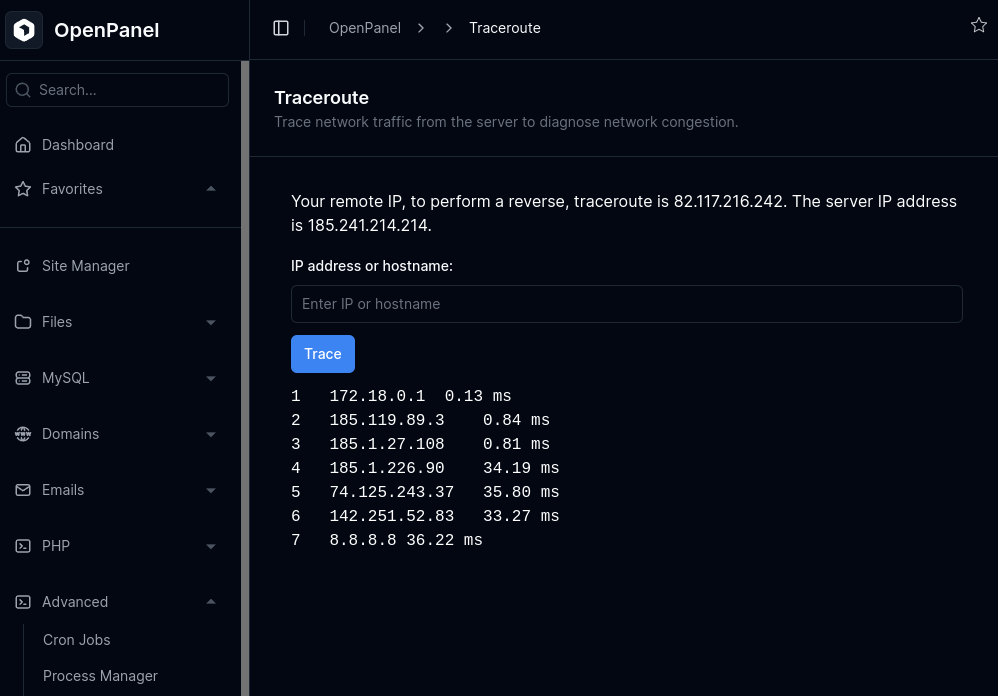
readme.txt
| Khoá | Giá trị ví dụ | Giải thích |
|---|---|---|
name | traceroute | Tên thư mục và tên plugin. |
title | Traceroute | Tiêu đề hiển thị trên Bảng điều khiển, thanh bên và tìm kiếm. |
description | Run traceroute to IP or hostname. | Mô tả ngắn về chức năng của plugin. |
link | /advanced/traceroute | Đường dẫn URL để truy cập plugin từ giao diện. |
version | 1.0.0 | Số phiên bản của plugin. |
author | Your Name | Tác giả hoặc nhà phát triển plugin. |
category | advanced | Mục trên Bảng điều khiển và menu thanh bên nơi plugin hiển thị. |
icon | bi bi-person | Tên class Bootstrap Icon dùng cho biểu tượng trên Bảng điều khiển. |
show_in_search | 1 | Plugin có xuất hiện trong kết quả tìm kiếm không (1=có, 0=không). |
help_link | https://hitechcloud.org | Liên kết tới trang trợ giúp hoặc tài liệu của plugin. |
Python
# traceroute.py

'''
.py file needs to have the same name as the folder, so f folder is 'traceroute' file needs to be named 'traceroute.py' in order to be imported.
'''

# import flask app
from flask import Flask, render_template, render_template_string, request

# import what is needed for this plugin
import socket
import struct
import time
import os
import requests

# For translations
# https://python-babel.github.io/flask-babel/
from flask_babel import Babel, _

# Import stuff from HiTechCloud core
from app import app, inject_data, get_hitechcloud_ip, login_required_route

# custom function example
def get_client_ip():
    if request.headers.getlist("X-Forwarded-For"):
        client_ip = request.headers.getlist("X-Forwarded-For")[0].split(',')[0].strip()
    else:
        client_ip = request.remote_addr

    return client_ip


# you can not run pip install for additional tools, and since mtr is not available in HiTechCloud UI container, we need to use vanilla python to simulate traceroute output
def simple_traceroute(dest_name, max_hops=30, timeout=1):
    try:
        dest_addr = socket.gethostbyname(dest_name)
    except socket.gaierror:
        return f"Error: Invalid hostname or IP address '{dest_name}'"

    port = 33434
    result = []

    for ttl in range(1, max_hops + 1):
        try:
            recv_socket = socket.socket(socket.AF_INET, socket.SOCK_RAW, socket.IPPROTO_ICMP)
            recv_socket.settimeout(timeout)
            recv_socket.bind(("", port))

            send_socket = socket.socket(socket.AF_INET, socket.SOCK_DGRAM, socket.IPPROTO_UDP)
            send_socket.setsockopt(socket.SOL_IP, socket.IP_TTL, ttl)

            start_time = time.time()
            send_socket.sendto(b"", (dest_addr, port))

            try:
                data, curr_addr = recv_socket.recvfrom(512)
                end_time = time.time()
                curr_addr = curr_addr[0]

                try:
                    curr_name = socket.gethostbyaddr(curr_addr)[0]
                except socket.error:
                    curr_name = curr_addr

                elapsed = (end_time - start_time) * 1000  # ms
                line = f"{ttl}\t{curr_addr}\t{elapsed:.2f} ms"
            except socket.timeout:
                line = f"{ttl}\t*\tTimeout"

            send_socket.close()
            recv_socket.close()

            result.append(line)

            if curr_addr == dest_addr:
                break
        except PermissionError:
            return "Error: Root privileges required to run traceroute."
        except Exception as e:
            return f"Error: {str(e)}"

    return "\n".join(result)


# Route should be same as 'link' in readme.txt
@app.route('/advanced/traceroute', methods=['GET', 'POST'])
# remove login_required_route decorator if page should be accessed without login (NOT RECOMMENDED)
@login_required_route
def traceroute():
    result = ""
    if request.method == 'POST':
        target = request.form.get('target')
        if target:
            try:
                result = simple_traceroute(target)
            except Exception as e:
                result = f"Error: {str(e)}"
        else:
            # use _( ) to allow localization of the text
            result = _("Please enter a valid IP address or hostname.")

    # this is needed for templates to overwrite global templates folder
    #exit the html file name accordingly
    template_path = os.path.join(os.path.dirname(__file__), 'traceroute.html')
    with open(template_path) as f:
        template = f.read()

    # return ip address for hitechcloud account
    current_username = inject_data().get('current_username') # returns username of the current hitechcloud account
    server_ip = get_hitechcloud_ip(current_username) # returns IP for the current hitechcloud account
    client_ip = get_client_ip() # returns ip form our custom function

    return render_template_string(
        template,
        title=_('Traceroute'), # title is shown in breadcrumbs and browser tab
        server_ip=server_ip,
        client_ip=client_ip,
        result=result
    )
Template
Tài liệu về template của Flask: https://flask.palletsprojects.com/en/stable/tutorial/templates/
<!-- traceroute.html -->

<!--
HTML comments are visible only when dev_mode is enabled
https://dev.hitechcloud.org/cli/config.html#dev-mode
-->


<!-- remove this extends line if you do NOT want the page to have HiTechCloud UI header, sidebar, footer.. -->
{% extends 'base.html' %}

{% block content %}

<!-- START page header -->
<div class="border-b flex flex-col border-gray-200 bg-gray-50 dark:border-gray-800 dark:bg-gray-950 p-4 sm:p-6 lg:p-8 sm:flex-row sm:items-center sm:justify-between">
        <div>
        <div class="flex items-center gap-x-3"><h1 class="text-lg font-semibold text-gray-900 dark:text-gray-50">{{_('Traceroute')}}</h1></div>

        <p class="text-sm text-gray-500 dark:text-gray-500">{{_('Trace network traffic from the server to diagnose network congestion.
')}}</p>
    </div>
    <div class="mt-2 gap-2 sm:mt-0 sm:flex">
    </div>
</div>
<!-- END page header -->

<!-- START page content -->

<div id="collapseAddNewUser">

    <div class="sm:mx-auto sm:max-w-2xl" style="display:block;">
        <form method="POST" class="mt-8" x-data="{ loading: false }" @submit="loading = true">
            <!-- all forms need to send 'csrf_token'
            https://flask-wtf.readthedocs.io/en/0.15.x/csrf/#html-forms
            -->
            <input type="hidden" name="csrf_token" value="{{ csrf_token() }}">

            <div class="grid grid-cols-1 gap-4">

                <div class="col-span-full sm:col-span-3">
                    {{ _('Your remote IP, to perform a reverse, traceroute is %(client_ip)s. The server IP address is %(server_ip)s.', client_ip=client_ip, server_ip=server_ip) }}
                </div>

                <div class="col-span-full sm:col-span-3">
                    <label class="text-sm leading-none text-gray-900 dark:text-gray-50 font-medium" for="target">{{_('IP address or hostname')}}:</label>
                    <div class="relative w-full mt-2">
                        <input
                            type="text" name="target" placeholder="{{_('IP address or hostname')}}" required
                            class="relative block w-full appearance-none rounded-md border px-2.5 py-2 shadow-sm outline-none transition sm:text-sm border-gray-300 dark:border-gray-800 text-gray-900 dark:text-gray-50 placeholder-gray-400 dark:placeholder-gray-500 bg-white dark:bg-gray-950" autofocus />

                        <button
                            class="my-3 relative inline-flex items-center justify-center whitespace-nowrap rounded-md border px-3 py-2 text-center text-sm font-medium shadow-sm transition-all duration-100 ease-in-out disabled:pointer-events-none disabled:shadow-none outline outline-offset-2 outline-0 focus-visible:outline-2 outline-blue-500 dark:outline-blue-500 border-transparent text-white dark:text-white bg-blue-500 dark:bg-blue-500 hover:bg-blue-600 dark:hover:bg-blue-600 disabled:bg-blue-300 disabled:text-white disabled:dark:bg-blue-800 disabled:dark:text-blue-400"
                            type="submit"
                            :disabled="loading"
                        >
                            <template x-if="!loading">
                                <span>{{_('Trace')}}</span>
                            </template>
                            <template x-if="loading">
                                <span>{{_('Loading...')}}</span>
                            </template>
                        </button>
                    </div>
                </div>
            </div>

            {% if result %}
                <pre>{{ result }}</pre>
            {% endif %}
        </form>

    </div>
</div>

<!-- END page content -->

{% endblock %}
Cài đặt
Plugin phải được đặt trong thư mục /etc/hitechcloud/modules/. Mỗi plugin nằm trong một thư mục riêng. Ví dụ, plugin traceroute phải được cài tại /etc/hitechcloud/modules/traceroute/.
Trong thư mục plugin, đặt các tệp sau:
readme.txttraceroute.pytraceroute.html
Nên cài plugin qua Git để dễ cập nhật. Để cài plugin traceroute, chạy:
cd /etc/hitechcloud/modules/ && git clone https://hitechcloud.org
Sau khi cài, dùng giao diện HiTechAdmin để thêm các tính năng của plugin vào các bộ tính năng (Feature Set) mong muốn.
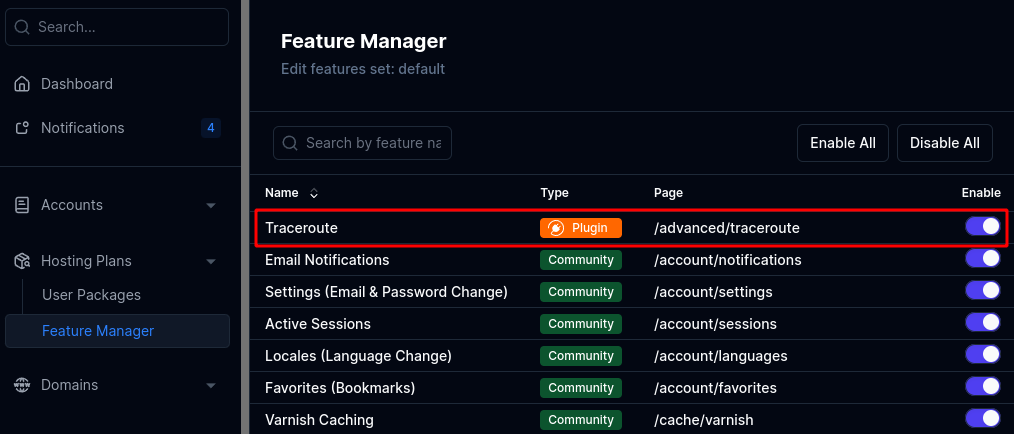
Cuối cùng, khởi động lại giao diện HiTechCloud để nạp plugin mới.